
A few days ago I had to repair a notebook with symptoms that didn’t look like a hard drive failure at all. But the problem was fixed after I replace the hard drive.
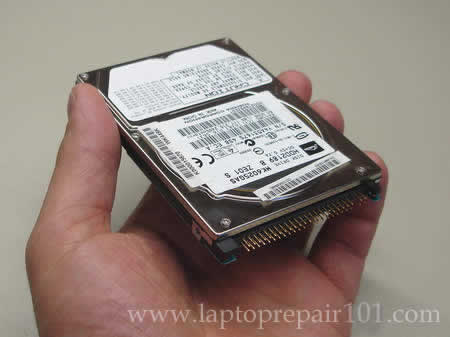
It was Toshiba Satellite A70-S249 notebook with the following problem.
When I press on the power button, the laptop starts up as usual and a red Toshiba logo appears on the screen. After a moment the logo disappears and the screen turns black without any faint image and flashing cursor. The blue light around the power button stays on and fans continue to spin normal but nothing appears on the screen. I noticed that the hard drive LED blinks green on the startup and after that shows no activity at all. After a closer inspection I noticed that the screen is not completely black (like dead black), it didn’t have any image on it but it had a very faint backlight (I would say about 3-5% of normal brightness). I was able to see that there is some backlight after I pressed on the lid close switch and the screen turned to completely black.
Here are my troubleshooting steps that I went through to find the problem.
First of all, I replaced the memory module and didn’t get any changes. Removed the wireless card, still had the same problem.
After that I removed the hard drive and started the computer. This time I got something. The notebook successfully passed the Toshiba screen and started looking for a boot device. I got some activity on the screen. To make sure that the notebook itself works fine, I booted it from Knoppix (live Linux CD) and successfully loaded the Linux operating system to the desktop. So, that’s the hard drive problem!
I installed the hard drive back in the laptop and tried to boot it again. The same failure occurred again; I got a black screen with a very faint backlight and no hard drive activity at all. I tested the hard drive with Hitachi DFT test and failed an advanced test. The problem is detected!
Finally I installed a new hard drive, reimaged the drive with a recovery DVD and got the laptop back up and running.
By the way, even though the customer’s hard drive failed the DFT test, I still was able to access it from another computer. The customer had important personal files on the failed drive. I connected it to our recovery desktop computer using IDE adapter. The “failed” hard drive was detected without any problem and I was able to recover the data.
95 Responses
Kel
I have a Toshiba A 75. I got it because of the rave reviews. After my warranty expired I am experiencing a dark bar on the left side of my lcd screen. how much does it cost to fix ? would it be the cable wire? Once I apply pressure it goes away. …
cj2600
Kel,
The bar goes away when you apply pressure on the display panel? If yes, then most likely it’s the LCD screen issue and you’ll have to replace the it.
sultanasherman
i have a toshiba laptop satellite m30x/m35x.. i cn operate it now.. when i switch it on, it says media test failure check cable.. how do i go about it… pls reply urgently
sultanasherman
thanx for your prompt reply and support.. i dint change any settings from the bios, i jus switched the laptop on and it gave me that message.. how do i go about it now???
cj2600
Sultanasherman,
Test the hard drive and if it fails the test, replace the hard drive and run a recovery DVD you got with the laptop.
Eric
I have a toshiba Laptop. My mother spilled coke on the keyboard but it seems to run fine… when it will run. It’s kind of odd. Some times it will start up, some times I’ll have to wait 10 minutes and try again. I have ran Spybot S&D + AVG, and a few other anti-malware programs. I really think this should be a quick fix as it seems to be more software based since it’s slowing down, but I’m not completly sure. I do not have a recovery disc or anything like thta as I bought the laptop as a friend.
Thanks
-Eric
Bijayalaxmi
Hi,
I have a Toshiba satellite m35-x laptop. All of a sudden it has stopped booting. It just shows the initial screen (Windows XP) and then the screen goes blank with a cursor blinking at the leftmost corner. No changes have been made to the BIOS config. Please help me… Thanks
highspeeddirt
I have a Toshiba M55 laptop and just noticed there is a piece of lint or a hair what seems to be under my screen. I tried wiping it off but it’s under the screen if that makes sense.
If I remove the bezel (the 4 screws holding it in place), would i be able to get in there and remove it? I wasn’t sure if there is a piece of glass or plexi between the bezel and actual lcd screen. Please advise. Thanks.
cj2600
Bijayalaxmi,
You might have a bad hard drive. Download Hitachi DFT test utility and test the drive. If the drive passes the test, then your problem might be related to a software issue. Back up all personal data from the drive (you can connect it to another working machine via an external USB enclosure) and reimage the drive using a recovery DVD you got from Toshiba.
BTW, can you boot into Windows in safe mode? Restart the laptop and press F8 before it starts booting into Windows. Select the safe mode line and try to boot the laptop. If it boots into safe mode then most likely you have a software issue and it will be fixed after you reimage the drive.
cj2600
highspeeddirt,
I’ve heard some people complaining about the same problem but I’ve never seen and repaired it myself.
Nope. If you remove the bezel (LCD screen mask) you will get an access to the screen but there is not glass between the mask and the screen. If I understand right, the hair is inside the screen and to remove it you’ll have to dismantle the screen itself.
Karen
I need to replace the hard drive on my HP Pavillion laptop. My question is what does it mean when the drives I am looking up online say 80gb 2.5, but HP part center says a replacement from them is 3.5. Does it matter? Or can I only put in a 2.5? I believe the 3.5 is referring to size? Hope this makes sense.
Thanks
hproblem
i have a hp nc6000, it boots into windows and then freezes what could be wrong?
Brian
My Toshiba laptop Hitachi hard drive has completely failed. The machine will not detect the original harddrive but will boot fine with a harddrive out of my other Toshiba laptop.
I have important files on the failed drive that I would like to recover (never were backed up). I purchased a Sata adapter and connected the failed drive to a operational PC and it will not recognize the failed drive. When I put a known good drive into the adapter the PC recognizes the good drive just fine.
What options do I have for trying to retrieve the data. I’m thinking that the only option
is to disassemble the bad drive, and a new drive and switch the actual failed drive disk into a new drive assembly.
Have you ever tried this, is it even possible?
At this point the failed harddrive data is useless, but I hate to buy a new drive and ruin it if this is not even possible to do.
Thanks
cj2600
hpprobem,
Boot the laptop into safe mode. If it will not freeze up in safe mode, probably you have software related problem – reinstall the operating system. Also run memory and hard drive test. If both successfully pass tests, try reinstalling the operating system. There could be hundreds different reasons why the laptop freezes up, there is no simple answer to your question.
cj2600
Brian,
I think the only option you have is a clean room recovery.
DON’T do that yourself. You will damage the hard drive and the data would be unrecoverable. But you still have a chance if you use a clean room recovery service.
nick
my problem is that windows xp will load and work in vga mode on an external monitor, and everything runs fine. When trying to switch the resolution, the external monitor goes black just like the laptop monitor ( the laptop monitor shows a faint (about 1% of normal brightness) no matter what mode the pc is running in. Tried reinstalling the video drivers, nothing. HD seems fine. tried reformatting and doing a clean install, the laptop monitor still was virtually black so i tried it with the external monitor and as soon as win xp tried to load for the first time, the external monitor went black too. Any Suggestions?
Omar
Just press F1. I have the same exact problem but after I press F1 (for some reason), the HD light comes on and the windows log appears with the loading bar.
Anna
I’m having problems with lcd panel for Toshiba M10. Since dropping my mouse the screen went black. Although the screen was black I could hear the system running and windows starting but now everything seems stopped. Any Idea of what this could be? thanks
Anna
Any one can help me? I have a sat pro m10 toshiba. Always worked well except yesterday the panel went black after I dropped the mouse. I hear it booting but no sound comes from it. I also tried to attach an external monitor but nothing happens the lap does not pick up. I have my essays in there (no data back up
🙁 Can anyone tell me what the prob myght be? Pleeez help.
Anna
thank you cj2006 for your reply and suggestion. I agree with you that the mouse was definitely not the problem : ) I think I now know why the system shuts down. Apparently I’m having probs with NVidia geoforce4 420 go which is making the system unstable. I have backed up my work any way. If any one knows about this problem please let me know what I should do next. Many thanks
Anna
stephanie
my laptop was working fine last night, when today it suddenly wasn’t working. it was working fine at first, the windows was starting, but after that, a dull gray color came on the screen. it looked like it was turned off, but it wasn’t since noise came out near the fan. then it turned off. and after a couple of seconds, it restarted. and repeated. can anyone help me fix this problem? i’m desperate!
Eric
Just an update on whats happened..
I decided to change the inverter as you wrote it can sometimes work fine and then not work. It looks like i’ve found the problem. Now that i recall, the screen was slightly flickering, very slightly before I changed the inverter and since now I have changed it I have noticed it doesn’t do that anymore.
Many thanks once again and I hope this information will help someone else..
Regards:
Eric
Ashley
I think I might be having a similar problem.
Okay — so, my mom took the toshiba to use it for playing spider solitaire. (It’s sorta hers now, and that’s all she does.) Well, when I got home from work, she told me that the screen was blank and it wouldn’t shut off. Sometimes it doesn’t load properly, but if you force a shut down, it’ll restart just fine.
So, I went to restart it, but it was hotter than normal. So, I forced the shut down and restart it. The blue light on the power button came on and the fan started. Then it just stopped. Nothing. it never made it to any screen or anything. I don’t even think the back light even comes up.
May we be working with the same problem? Also, I was wondering if there is any way in bringing it back to life.
It’s a 2003/2004 (I honestly can’t remember) Toshiba M35X. Recently, I sent it under warranty to have the power jack fixed (with your instructions so the people won’t make it worse). Before that, the button that ejects the card on the right (name?) was replaced, and when the people who fixed it messed up the sound card, they replaced that. That’s all the work I had done on it.
All emails are appreciated. I’ll gladly help all that I can with anything. I know enough about computers to get by, but not a hellova lot.
cj2600
Ashley,
If you purchased your Satellite M35X in the United States, you can get a free repair from Toshiba. They extended warranty for Satellite A70, A75, M30X and M35X notebooks. Call Toshiba and ask them about the extended warranty.
J Brincau
If I do not plug the ac power supply to my computer i get a very dark screen, no difference if I try to improve brithness by contrast sequence buttons. Computor is very dark if I use on its battery.
cj2600
J Brincau,
On some laptops you can adjust the brightness level in the BIOS. Check the BIOS settings. Enter the setup menu and see if you can increase brightness for the battery mode in there.
Travis Musseau
hi. i bought a toshiba a-100 last november. i recently kept getting bluescreens all the time. even picking up the computer resulted in a blue screen. i was thinking a corrupt hard drive or bad memory module. it was still under warranty so i brought it back and they took it for 2 weeks, got it back today, got home it worked fine for about and hour. then i started putting my programs back on and i got the blue screens again. and as before, it wont let me recovery my xp using the toshiba recovery discs. they put in a new hard drive so im assuming its the memory. it says im missing system32/hal.dll now. idunno i waited 2 weeks to get rid of the blue screens and now i have them all over again. email me if u can with any solutions!! thanks
leanne arnott
recently iv been leaving my laptop on overnight etc when i came to use it yesterday a blue screen appeared asking boot sequence i think that dissapeared and now it starts up but just stays on a blank screen with a flashing dash (-) in the top left corner i need help!!!thanks
im desperate please email me if you can help 🙂
cj2600
Leanne Arnott,
Sounds like a bad hard drive to me. Run diagnostics on the hard drive and if it fails the test, replace the hard drive.
Andy
I have Dell 600m and it was not booting up (i.e. it show the initial boot BIOS process but then blank black screen). I called up Dell Technical support, the ran System Diagnostic test and said that my hard drive is BAD. I bought a new hard drive and installed it. Still when I boot my laptop, it stays the way (i.e Blank Black screen) though I have OS CD in drive.
I even tried to go in setup (by pressing F12) and marked it to boot from CD but it does not do anything.
Interestingly, if I remove my hard drive then it boots up from the CD drive.
Can someone help?
DilsherSingh
I have a desktop(assembled) the mouse pointer is stuck on the screen .I tried by restarting the computer and also checked the PS2 port which was in good condition and also reconnected the wire but could’nt get any result.Tell me any other trouble shooting steps.
Ish Loum
Dell laptop. When I turn on the laptop. I can hear it booting up but I can only see a light grayish screen instead of the windows Operating system. Is this a screen problem or somethingelse?
cj2600
Ish Loaum,
Can you see Dell logo on startup? Test the laptop with an external monitor attached to the laptop. Can you get the external monitor working or it has a light grayish screen too?
shadi
I have forgotten my laptop on standy before travelling, 45 days later I came back and encountered this problem:
when I switched it on for some reason it wouldn’t boot up. It starts and as it tries to load Windows I get some error message on a blue screen which only stays on for about a second so I can’t read it. Then it reboots itself and I get a message saying there has been an unexpected error etc and asks me whether I want to try booting again normally, or in safe mode etc. I’ve tried in safe mode and all the other options but it just does the same thing. When the Windows XP logo appears and it seems to be loading, it then takes me to this blue screen with an error message and then straight away reboots itself.
floor4th
i have the same problem, though i ran the diagnostics test and nothing was wrong. help?
bret
When i start up my laptop the hardrive light comes on with the power light and the fan starts up but then they hard drive light and the fan stop but the power light is still on, and the screen never lights up at all. Help!
cj2600
bret,
Check the memory slot on the bottom of your laptop. If you have a memory module in this slot try removing it and start the laptop. Will it turn on when the memory module is removed?
bill
Hi, I have a TOSHIBA M35X-S161 SATELLITE every time I try to boot the red logo comes on and then windows and then nothing!!!
my screen turns black power light still on the fan shuts off, i tried cleaning up the fan i thought it was dirty and it’s not cooling the system but didn’t help, I reseated the video card and still no luck,and I even tried to boot without the hard drive but problem still exist, do you think buying a new motherboard will be a good idea?
or how can i test the system when the laptop doesn’t work? please please help me it’s driving me crazy,
Thanks
cj2600
bill,
Can you boot the laptop in Safe Mode? Did you try using Last Known Good Configuration option?
This can be software related problem. You can try reinstalling the operating system from the recovery disc.
WARNING. If you use the recovery disc it will erase all personal data and reinstall everything back to factory defaults.
Jeevan
my Toshiba 1900-303(a discontinued model) encountered the same problem…
funny enough i managed to get it fixed by repairing the windows..
i put the bootable CD and it detected it, choosed the option for repair the windows and then it showed the windows loading logo and everthing started normally..no dead screen..
so maybe in some of the laptops, the problem is just a damaged windows copy!!
Koert
Is it possible to boot and run a laptop with no hard drive installed? My Gateway ARC200 has a “known problem” with a poorly engineered cable/connector.
I hate to throw the computer away and was wondering if it’s possible to run small programs, surf the internet, and watch DVD’s by booting directly from a USB or PC slot. The BIOS supports booting from external devices, but I don’t want to dive in until I can be relatively certain that I’m not wasting my time.
Thanks!
thantin
I have a TOSHIBA SATELLITE model every time I try to boot the red logo comes on and then windows and then safe mode.
I boot in safe mode but it comes black screen & nothing.
why ?
I also need the recovery disc. where can i get it ?
cj2600
Koert,
Yes, you should be able to boot and run your laptop even when the hard drive is removed. Here’s what you can do. Download Knoppix – live Linux CD and burn it on a CD. Boot your laptop from this CD and you’ll be able to run Linux from the CD. You’ll get all applications you need – web browser, music player, text editor and much more…
Try Knoppix, it’s very cool OS.
cj2600
thantin,
Could be software related problem. Try reinstalling the operating system from the recovery disc. Call Toshiba and ask them. If you have a newer model, most likely you can purchase a new recovery disc directly from Toshiba.
Cindy
I turn on the toshiba satellite laptop and it comes up with a reddish hue then a second later goes to a black screen and then shuts down.
I tried re-booting but the same thing happens.
What should I do? Is it worth it to fix?
lin
my laptop the power button on my laptop goes on well, but no vision come out on the screen..the had disk is not loaded, the indicator light flickers for a few times and then gone, and the laptop screen stays black, and nothing else happened. Advice please? What is the problem? Thank you in advance.
cj2600
Lin,
Could be bad memory module or bad connection between memory and motherboard.
Try reseating the memory module, move it into the empty slot.
Try replacing it with another known good module if you have any.
samson
I tried memory module test.
It is working.
This is my first repair on laptop.
Thank you very much
basil
well my external hard drive suddenly become strange when ever i connect it to my pc i can see the two paritions i have and all the files but its too slow not the same as before and if i tried to transfere any data from to my pc it will tranfere few megabites and then freez until i disconnected.!!! any solution for that?!
George in Toronto
Harddrive problem–My laptop went dead screen.Bought another similiar make model.Put the HD from the old and when prompted to move arrow keys,screem went blank and hook-up t0 monitor nothing.Harddrive or fan running. Tested HD and found defective. Question–what damage has the harddrive done to the motherboard and is there any fuses to be found.I’m told anywhere from 10 to 20 minityre fuses exists Fujitsu laptop with a bad Toshiba GH IDE. Anyone know a good site to learn about laptop fuses. Unit is not worth sending in for a fix.
Let george know
Gada.2004@3web.net
Guido
Hello!
I have Fujitsu-Siemens notebook (Amilo-EL) and i had the same symptoms – blank screen, no thing else, but HDD spins up. I tried an usb adapter for data recovery, another computer recognised my hdd, but capacity=0. Then i bought different adapter – non-usb one for connecting laptop hdd with desctop IDE cable and this solved my problem, i managed to recover all of my data.
The HDD was Toshiba MK2018GAS
Cheers!
perrin
good way to get it goin again!!!
any way you could tell me how to remove the hard drive? cause thats exatly ehat happend to my (i dont have the disk cauze it was a xmas gift
dvu
Hi,
I am looking for a help to my thoshibha m35 s355 laptop. Initially i spill milk on the keyboard. Once it dried up the laptop was abel to bootup and OS (XP) also started. But when i pressed the key i got memory dump. I opened the laptop and checked. Now i am getting the hard disk failur error.
A. Is there is any shop will check only the hard drive and see whethere hard drive is having problem?
B. If so whetehr replacing the hard drive will help? (I see some dried milk on top of the hard drive when i opened the computer)
I really need a help.. I reallyd ont want to through this computer.
cj2600
dvu,
You can bring the hard drive to the repair shop and they will test it for you. You can run Hitachi’s drive fitness test yourself and find out if the hard drive can pass the test.
It depends. It’s possible the hard drive controller is damaged. If that’s the case, you’ll have to replace the hard drive.
Robert B
ALL HAIL cj2600:
THANK YOU!
I’ve just spent 4 days and 35 hours searching ALL OVER THE INTERNET for an answer to the symptoms above. I have a Toshiba Satellite M45 doing the same thing.
If it means anything, you seem to have found the answer to the “Satellite Syndrome” that no one else has an explanation for.
My HD tested normal, happy and was not showing error codes or over temps.
An insidious problem solved…
Robert
shemeer
hai dear
thank you for your site………
i am working as technician in saudi. i am only 1 45 days here..my country is india (kerala)/// ther i only do desktop……but here all are laptop…..so your site is very helpfull to meeeee and to all like me…………i have to ask you that….is it must study electrics as course to devolop and work as a laptop techncian. ????? i only studied with my hw course…no more course in electroics……….. one of my fiend told me that……..then ……….tell me how to devolop my ebility………..
then okkkkk
byeeeeee
Jeni
Hello,
I noticed this quote in one of the results to a search I performed trying to figure out how to diagnose my hard drive: “You can run Hitachi’s drive fitness test yourself and find out if the hard drive can pass the test.”
My Toshiba Satellite M45’s hard drive crashed and through various resources, I have found that it appears I should run a Hitachi disk drive diagnostic on it. The above-pasted comment from your web site helps confirm this for me. (As well as Toshiba’s complete lack of any references to diagnostic DIY software on its web site. Many negative comments and complaints on the numerous forums I’ve read in the last few days.)
There are two HD diagnostic programs on Hitachi’s web site. Is the diagnostic for my machine the “Drive Fitness Test” or is it the “OGT” – I am very new to all of this, and quite unfamiliar with the innards of any computer. I have access to my make, model and serial numbers, but have not been able to find the HD’s manufacturer anywhere.
The M45 laptop is over 4 years old, but was running fine up until about four days ago. I have everything backed-up to a Maxtor external hard drive, with the exception of my Outlook emails and contacts’ information. If there is a way to access and/or extract this information from the HD (screen is totally black on the machine, though fans and panel lights do come on when I power it up) without running the diagnostic, perhaps someone would be willing to share that with me.
Any comments or other help is greatly appreciated. Thanks.
Kind regards,
Jeni
richard
i use to have this same problems too on most of the laptops. on most of the solutions to the drive i use hirens boot disk to fix it. sometimes bad sectors cause much to the drive.
Pranab
your site is very informatuve and helpful ,i had send the link to all my service guys ,i run a service center in calicut Kerala
keep updating with all models
Thank you very much
Charles Sambani
I have just discovered your website through Google Search Engine and have fallen in love with it. I am an upcoming electronics technician in Malawi and to keep myself uptodate I like reading articles on electrical and electronics. You put educative materials on your website good enough for the technicians. I will be a regular visitor of your website. Please keep it up and thanks.
Charles Sambani – Malawi
Vilma Rivera
My Toshiva laptop will continuosly repeat a letter or sign and will not accept any command, I just push all keys until it stops. what could be wrong, does it have solution.
cj2600
Vilam Rivera,
Sounds like you have a stuck key on the keyboard. You’ll have to replace the keyboard.
Also, it’s possible that you have a problem with the keyboard controller on the motherboard but it’s not a common problem.
mukesh
i got this site from the google after reading some tips and troubleshooting steps i repair my Dell vostro 1000 in a very easy way ……
thanks for the publishing these kinda of tips and repairing steps.this site tells the common fault in the laptop .
THANKS Bro…
Maroof
I am laptop engineer. i am in suadi
i got this site from the google after reading some tips and troubleshooting steps.thanks for the publishing these kinda of tips and repairing steps.this site tells the common fault in the laptop . very day iam red this site.
mark
i have a toshiba satellite p30-110 when switched on u can hear the cooling fans running but the screen is so dark that its unreadable. everything runs ok. the blue light around power button stays on. also i’ve noticed that the hd light stays green all the time with nothing appearing on the monitor. i got the pc 4rm my dads office. i found out that the hd has been tempered. pls tell me the problem
cj2600
mark,
1. Remove the hard drive. Try starting the laptop with hard drive removed. Can you get image on the screen this way?
2. Try reseating memory modules. Remove them one by one. Test the laptop with each module separately.
EroticaXP
Another one for the knowledge base. I once had a client with a MSI notebook. I have previously installed Windows on that laptop a while ago but due to user’s lack of experience i had to do it again. I started installing until a point when blue screen (BSOD) ocurred. I ran all the test necessary MemTest+ and a series of HDD tests. All the HDD test said that the HDD is gonna crash soon due to SMART parameters. I told the customer to buy a new HDD which he did. I installed the new HDD in the notebook and succesfully installed Windows on it. The old HDD was given to me by the previous owner to do what i see fit with it. I plugged it in to my desktop computer and was easily recognized. When i saw that it was working i copied all the important and unrecoverable data my client had and formatted the drive. Gave back the laptop and data to my client and came back to the HDD issue. I tested the HDD on my desktop with previous tests to find out that now SMART parameters are within limits. I am using that HDD ever since (about an year ago). I have ran tests under Windows too using different softwares and the HDD seems to be fine.
dave brennan
am i missing something? this looks like a great site, but i dont see a “contact us” or any other way of asking a question. i hope there is . it might be the only way to save my 7140ct from the dump. thanx.
Ugen E.Blessing
I stumbled onto your site and was pleasantly surprised at what I found.The is heavily loaded with lots of useful materials.kudos to you and pls keep it up.
I’m trained computer technician but never really got to actively practice the trade.Of late,I’ve been seriously thinking of geting to go into active practice but not on desktop computers.My intension is to attend a serminar on laptops and notebook repairs.Now,that I’ve found your site I know resources for training will be abundantly available,also I will like to purchase a comprehensive video tutorials on laptop and notebook repairs if it’s available.Once again,keep the good work going.
Thanks.
(Nigeria)
cj2600
dave brennan,
Nope, you are not missing anything. There is no “contact us” because I cannot answer all questions individually.
If you have a question, post it as a comment. I’ll answer if I know what’s going on.
Dave
Thanks for your very informative site. I have a dead Gateway 7320 laptop. The hard drive is fine as I’ve put it in a working 6625 to recover the files. Power cable checks good with 19v. How do I test the motherboard? This is my son’s unit and it smoked up early on, but still worked, then it did it again about a year later and is now dormant. Thanks again, Dave
owen
hp laptop is not switching on after several attempts then it might suprise you after continuosly attempting by switching on
i tried removing all external parts until am left with the board only and still it will switch on for a few seconds then turn off.
however after several attempts it might turn on and remain on
xanos
hi,.. 1st this is not about harddisk failure,it is about sound problem with my acer apire 4520 lptp. I’ve try so many solution but again it fail.. can anyone here help me please.. I’ve already install the driver for sound driver but the fail to start. the icon were not present at the botton screen and in control panel the there were no realtek device controller..Again there were issue about the UAA HD audio bus driver with this model.. i’m a bit confuse about this situation..please help me.. i dont know were to find the answer for this.. tq…
Daniel
Hi,
I have a ASUS laptop and since yesterday it freezes after Vista starts up. I can access SAFE MODE though without any problem.
When it happenned I got blue screen with saying someting like “your computer will be stopped to prevent damage to your hard drive”, then after restart I got message that there isn’t bootable drive, so I switched it off and on and Vista started normally however it freezes every time.
Do you think it is faulty hard drive?
Thank you,
Daniel
cj2600
Daniel,
Will it work properly in VGA mode?
Can you try Last Known Good Configuration?
Also, you can try using System Restore. Boot the laptop in Safe Mode, access System Restore and revert OS back to the time when it was working properly.
I think it’s possible. You can download and run hard drive test utility. I usually use SeaTools from Seagate, it works fine for many different hard drive brands.
Download this utility, burn it on a CD, boot the laptop from the CD and run Long hard drive test.
If errors detected, you’ll have to replace the hard drive and reinstall Windows from scratch.
iliya
hi…i do know what happened wif my laptop.
it happened several times, n until now no one can fix it.
can u help me in solving this prob;
when i pushed the power button, there was nothing on the screen..
-blank-
n all the lights, such as power button, WIFI signal light, battery light, etc-all the light are blink blink..
please help me if u know.thank u so much.
Ivan
Hi, I have an Acer 5720 notebook with a strange problem.
It turns on, power LED on, fan on but black screen (even with external monitor) and the strange thing is that hard disk does not spin at all and cdrom have the LED always on and if I press eject does not work.
I tried also the motherboard alone without any other card installed, so no wifi, no modem, no pcmcia, no hard disk, no cdrom, nothing, only RAM and the problem still present.
Please let me know what do you think.
Thank you
cj2600
Ivan,
Did you try known good memory module? Because this could be memory failure.
Also, if you have two memory modules installed, try removing them one by one and test laptop separately with each one.
If replacing/swapping memory doesn’t help, most likely this is motherboard failure.
Ivan
Yes, I tried to use only one memory module, changed with a new module but the problem still the same.
I know that the problem is motherboard but I should know where is the problem!
I tried also to clear CMOS but there is nothing to do.
I measured voltages on the voltage reg. inside and I have 5 volts, 3,3volts and a strange 7 volts, what is used for?!
I should have also 12volts but I cannot find it.
Thank you
agus
How can I find the Knoppix?
cj2600
agus,
Google Knoppix. 🙂
laide
laptop restarts itself anytime a cable is connected or disconnected and sometimes the wired and wireless card don’t work.
safaethan
you can use backtrack5 or any other linux live cd……….@cj2600.
@agus
Christos
Hello and thanks for the info. For the last month i have my laptop TOSHIBA A300-1LT with problems. Either freezes or restarts during sturtup while loading the OS or after login or during the usage. Tried EVERYTHING!, Recovers, Hard format, Windows Vista, Windows 7, Ubuntu. All the same symptoms. Hardware problem for sure. The point is that symptoms are not constant. Sympotms are coming up mostly when laptop is cold i.e. the first tries in the morning i always have problems of restarting or freezing. When i say cold i mean the temperature inside the case not environmental. If the whole system become normal warm then becomes more stable. Almost no problems at all. Memtest86+ is OK for 2 passes. HDD diagnostics that included in all OS are OK. Only the GWSCAN from UBCD is the only diagnostic that run on my tohiba HDD in boot mode after the extended test showed sector relocation error (0226). So my question is is it HDD problem? Should i eliminate motherboard or GPU problem? ANyone facing the same “cold” problem?
cj2600
Christos,
While running Memtest86+ try applying some pressure on the memory chips. Does it start giving errors after that? It’s possible that one of the memory slots (or memory module) is failing.
Christos
@cj2600
Thank you for your response. Update on my situation…
I changed HDD and got the same problems. I changed my memory modules with 2 others and got the same problems. The point is that BIOS and memtest recognize the modules in all my cases, so i guess based on your response that one of the slots is the problem and loses its connection with the module during operation. So i guess i should find by “try and error” the problematic slot in order to stop using it.
PS sorry for my english not a native speaker
Christos
@cj2600
After trials with other 2 memory modules tested in both slots (one by one) at all cases i get reboots or freeze. I guess that means either both slots are dead (jack pot for me!) or i should call my motherboard RIP.
Any other ideas or should i start searching for a new laptop?
Regards
Christos
cj2600
@ Christos,
Try using memory modules one by one. Try different slots.
If the laptop still freezes, I guess this is some kind of motherboard related failure. It’s possible there is a micro crack somewhere on the motherboard.
Lostin translaptation
My wife’s laptop has been dead for a few weeks now and I am finally working on it at work because I have some time.
I can fix most issues with hardware and sometimes software…but this one has me dumbfounded…
pulled hardrive…got same symptoms as article writer…must be hard drive I automatically assumed..
I have the USB harddrive hook up to pull up the harddrive and I can’t even get that to connect…never had a problem before…
The drive was recognized but I believe it is either literally dead or physically. About to call Toshiba because she has had it less than a year…
ET2010
i have a serious problem, from 3 weeks my daughter closed my laptop monitor and when i try to open the computer again it didn’t work at all, the computer didn’t see the HDD from any where the HDD is disappear the computer says there is no hard drive and i hear some noise from the HDD i’m trying many many times and the hard still not working so i get new HDD and when i put it it works after that i connect the old HDD with USB but again the computer didn’t see the old HDD at all, so i connect it with anther desktop computer and my HDD didn’t appear, i try many programs to make the computer see the HDD but no 1 of them works, i don’t know what to do with this HDD i have very Important data in this hard and i need to recover this data i need this hard to work 1 time only. thanks
Donna
I have a Toshiba Sattelite S855D-S523. I’ve only had it a few months but intermittantly I will turn it on and it will partially boot up and then suddenly just go off with no warning. It has been doing that since I got it. The last few days it says windows was unable to start. I let it go back to a previous time and that worked for a week or two but now I’m getting the same message. I go through the repair process and this time I didn’t do the previous time period routine I click on finish and it goes off. Then I restart and everything is fine again. However I put the symptoms of a failed hard drive into google and I am immediately rerouted to this page. My friend said he had a similar problem and that turned out to be his problem. I just want a computer that works and I am very annoyed ghat this one doesn’t because I am using it to take online classes. I will be contacting Toshiba.
jagan
Hi..,
i have use windows 7. i forgot my admini possword…, how to reset or how to recover
max
Hi,
I have an HDD issue on a laptop ASUS A6J, and the problem, even if different, it looks interesting.
After a successfully OS installation (i.e. Windows 8, Vista or Linux), the laptop boots without problem.
But when the laptop remains powered off for while (tens of minutes), then it does not boot because of the error:
No bootable device. Please insert boot disc and press any key to continue…
It sounds strange to me, because the BIOS always reads the hard disk correctly.
The SMART functionality also does not show any issue, as well as various HDD tools used for diagnosis (i.e. Hiren’s CD, Windows check).
I have tried to replace the hard disk, but the problem persists: then it seems not related to a specific drive.
I thought to a battery CMOS problem (since it is older than 10y), I replaced the CR2032 but the issue remains exactly the same: cold boot does not work, warm boot is fine (i.e. by booting from a CD/DVD).
Any idea?
peter
Followed the “towel cure” before I try to baking the motherboard of my Presario v6000 and already after 20 min.the screen came back to live!! 🙂 I keep it 1,5 houers in the towels,as it dont get it really good hot…but it helps..Hope it wil stay some time..Great site!! Thumbs up.The laptop was out of bussines for 3 years,as I was not really in to it to take the motherboard out…but thanks god its solved now.
Sharon
Hello, I’ve Acer 5749 laptop. My laptop stopped working. When I plugged the charger I can see the blue lights on but when i on the computer it still remains black And there is no sound