
Is it possible to fix laptop memory slot failure with a guitar pick? Yes, it is. You will not fix the memory slot itself, but you can work around the problem. 🙂
Today I received a Toshiba Satellite Pro 4600 laptop with the following complaint:
The laptop starts and works properly, but recognizes only one of the two memory modules installed. The laptop has two 256MB RAM modules installed, but registers only 256MB.
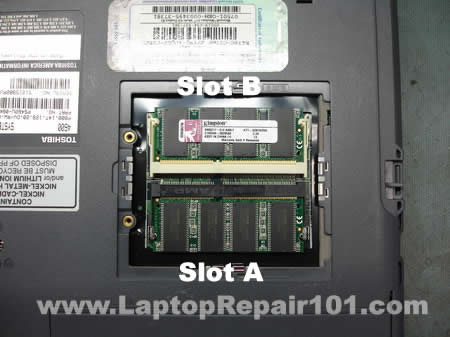
First of all, I removed the memory cover to find out if both memory modules are installed correctly. The laptop had two 256MB Kingston modules installed and they were seated properly.
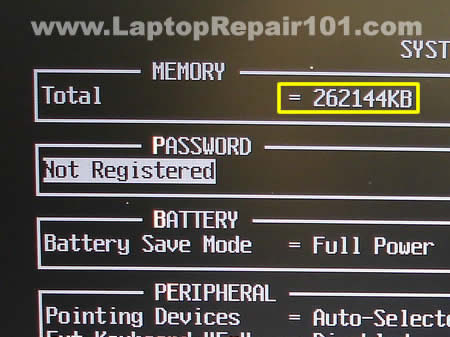
When I started the laptop and entered the BIOS setup menu, I found that only one of the two memory modules is detected and the laptop registers only 256MB (262144KB) of RAM instead of 512MB (524288KB).
Just a side note. In the computer world 1MB=1024KB. That’s why 256MB=262144KB and 512MB=524288KB.
I tried reseating both memory modules but it didn’t help.
After that I tried installing both memory modules in both memory slots one by one and here’s what I found. The laptop worked absolutely fine when both memory modules were installed into the slot A, but failed to boot with both memory modules installed into the slot B.
Apparently, there is nothing wrong with the memory modules and the laptop has a faulty memory slot B. The memory slot is permanently soldered on the motherboard. If one of the slots fails you’ll have to replace the whole motherboard or use the laptop with only one working slot.
Buying a new motherboard for this older laptop wouldn’t make any sense because it’s too expensive, but the laptop is still in a good working condition except the faulty memory slot B, so I continued playing with that trying to find the solution.
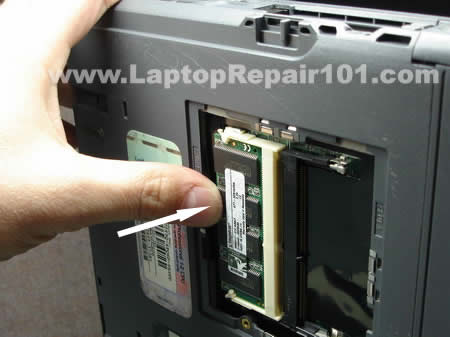
I noticed that the laptop start normally with the memory module installed into the faulty slot if I slightly press on the module with my thumb. And this gave me an idea.
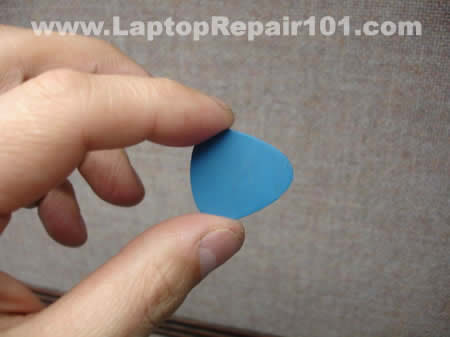
This guitar pick is going to fix my laptop. 🙂
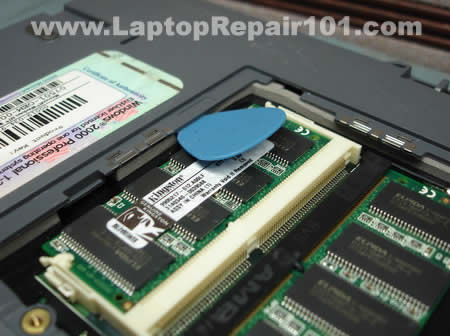
I installed both RAM modules back into the slots and then placed the guitar pick over the module in the slot B as it shown on the picture.
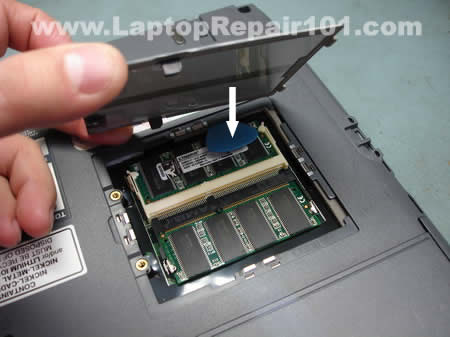
I thought if I close the RAM door it will press on the guitar pick/memory module and it will have the same effect as pressing on the module with my thumb. And it worked!
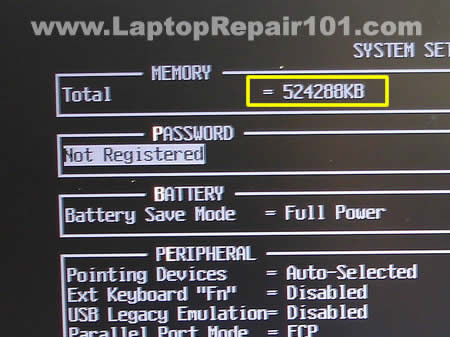
Both memory modules were detected properly and the laptop registered all 512MB. After “the fix” I tested memory with Memtest86+ and the laptop passed the test.
I wouldn’t call it the best solution for fixing a faulty memory slot but in some cases it will work.
By the way, I didn’t charge the customer for this “repair”, he knows what is going on and how I “fixed” his problem.
67 Responses
Mary Kay Jones
I need info on taking apart a Gateway MX6440 notebook. Please tell me where I can find this information.
Mary Kay
TheKookie
Had office depot techs destroy a SIMM slot on a P1 overdrive machine and they taped the SIMM memory stick into the slot using masking tape a few years back.
This is what that reminds me of.
Mind you, over time the solder joint will go, but hey. The next tech to look at it is going to have a serious WTF moment.
cj2600
TheKookie,
Before I “fixed” the memory slot I talked to my customer and explained that he has three options:
1. Replace the whole motherboard and this option will cost him a few hundred dollars
2. Use the laptop as is with only one good memory slot
3. Use the laptop with my fix and see how long it last (by the way, I didn’t charge him for this repair).
He decided to go with the option 3.
TheKookie
Here’s a good one.
Had a laptop with memory that was *perfectly* loose; you smack the machine, it start failing the memory test (windows memory diagnostic) HARD, then it goes back to normal. Smack it again, it f*cks up, then it’s ok.
So, I reseat the memory. Works fine. Smack smack smack, ok. Drop it an inch, hardlock and the screen goes blank. :O
Running it through a pcdoc 6 hdd test. Lets see if it hardlocks in pcdoc again.
I’m calling this the “Smack-test” in my logs and I’m going to see if management (who reads them daily) asks.
TheKookie
cj2600. I agree wholeheartedly that the solution is a good one; I wasn’t accusing you of being a bad tech. I am highly entertained. The permanent best solution is to get a soldering iron with a very fine tip and go to town and charge the guy for the labor, but hey, that’s just me; I can be a greedy bastard.
What I’m saying is guy is probably going to sell the machine to get his money out of it upon sensing it is going and buy a new one, and when the thing fails again a year down the line, the next tech is going to open the laptop up, look inside, see a guitar pick stuck in a memory slot and since most aren’t as sharp enough to understand why it is there, blow a brain gasket
Or what’ll happen is it’ll fail and he’ll forget and take it to you again, who will not also remember, and will go WTF at your own quick-e-fix.
Ok, I’m going off the deep end into cluthulian insanity, can you blame me?
Now the REAL question is, what are you doing with a guitar pick at work man? Don’t you REALIZE? Music leads to dancing, and dancing leads to shenanigans! And bosses don’t like shenanigans!
*looks around, puts on headphones, starts disassembling something expensive with a hammer and a screwdriver*
cj2600
What am I doing with a guitar pick at work? This is one of my main tools. 🙂
TheKookie
Sounds like your employer doesn’t understand the wisdom in investing in tools.
I had one employer who had 2 botched test PSU’s in 2 seperate departments; the molex connectors came undone. Do we store-use or even borrow the $8 punch tool on the shelf?
Nope.
We replace both supplies and I make darned sure they’re both BTX so the same problem doesn’t happen again. $100 a pop.
I can see a certain wisdom and advantage over a good flathead of the right size (I bring 4 separate sets of screwdrivers to work) will do the trick and unless the customer is a complete ass they will never notice the microscopic indents.
*hopes this doesn’t turn into a nerd-war*
Hrm, now here’s a question. How bout a guide on dealing with warranty shops that don’t want to do the repairs?
cj2600
TheKookie,
What do you mean don’t want to do the repair? If the laptop is still under warranty and it’s broken, they have to fix it. They will not repair the motherboard, just replace it with another one but who cares? If it works, it works.
I work for a warranty center and we do not repair parts under warranty, we just replace the whole part, even if it’s something simple like a broken power jack. Replace the whole damn board. 🙂
Luke
Hi I have a lapatop made by great quaility and would like to know how to take it apart as I have a bad vibration in the cd burmer
Can anyone tell me if they have ever had a noisy cd burner on a laptop it makes a vibrating sound
cj2600
Luke,
First of all, test your DVD drive with different CDs and DVDs. Do you have vibration with all of them or with only one particular disc? It’s possible that your DVD drive is fine but the disc is bad.
If you have same problem (vibration) with different CDs and DVDs, there is something wrong with the DVD drive. In this case you’ll have to replace the drive.
Thekookie
On the warranty thing.
I send a unit to HP; fails PCDoc 6 loadtest . Likes to slowly corrupt windows installs. Passes Proc/Mobo/Memory/Video/HDD.
They send it back with a bios update stating they could reproduce the issue.
Still fails PCDoc6 Load test.
I send it in again. They give me an estimate for $300 for a failed HDD; this is a move to blow me off. Now it passed a HDD test when it came back since I saw it comin’ and retested. I have a pretty good idea at this point it is a bad mobo. I use my contact, get them to repair it free of charge. They send it back stating they could reproduce the issue and fixed it. I *also* request they pull the HDD and just run a quick PCdoc 6 loadtest; same as what I have (I do a lot of HP, I’ve got all their tools so their shop reporduces what I find); they say “nope, no other problems, just a bad HDD”.
Still fails PCDoc6 Load test.
I do a full pull-apart diagnostic, test only mobo/mem/LCD/KB/Powerswitch, nothing else. Nada. 100% sure it’s a bad motherboard; I state as much in my request.
Send it in a 3rd Time, they state they could not reproduce the issue, then place an alpha version of a new bios with heat-related updates on it. Previous version of the bios also had heat-related updates to the fanbus algorithm.
Still fails PCDoc6.
They don’t want to replace it. The unit is 2 years out of manufacture and under warranty. They see the issue, they know its there, they just don’t want to fix it; they want to cover it up.
I’ve sent machines to warranty, had THEM spill soda and liquid damage, then return it. I don’t persue it any further; if on occasion they want to dump a bad unit on the retailer I work for I’m not opposed; everyone does it. If they dump a lot or just don’t fix a lot, that’s a problem.
Same as with instead of replacing a faulty dvd-rom drive they’ll ghost a new image of the recovery partition onto the unit. I test everything they send back since about 1/5 repairs is either spottily done or not done at all. Out of 150 warranty claims I’ve had one NTF from em’ in the last 11 months.
Sony, Toshiba, Fujitsu; they all do it from time to time, some more than others There’s a mistake, then there’s incompetence, then there’s competent techs who’s bosses say “don’t replace any parts”. I’ve seen it done.
Ian Basore
I have a question.
I want to upgrade to upgrade the memory in my Toshiba Satellite 1135-S125 from the original 256mb to 1gb. I talked to some guy at “laptopmemoryupgrade.com” and he said I’d have to use two sticks of 512mb instead of just a 1gb stick. I know this machine only can take a maximum of 1gb, but do I have to use two 512mb sticks? If so, it’s not really a huge problem, 512mb sticks of the PC2100 sodimm ram for it aren’t too hard to find, but I was just wondering.
jason
Your a STAR 🙂 great thanks Soooooooo Much i thought my old faithful had packed up, but its like you said it picks up the slot-b with a bit of packaging of some type along the connector, i used foam rubber and works fine 512mb
dejison
i have been having problem on my laptop over virus. I have instell diff. type of antivirus and still yet i am tried to download music video on my memory card or flash the virus on my system will distroy the video already inside the flash or memo. The avira antivirus i downloaded on it before was corrupted before i download another,when installing with be get to an extent and indicated “crc failed in basic\aecore.dll
unexpected end of archive”…..Pleasle what can i do to solve this problem. Thanks.
rowzee
Wow, this is so cool, thanks a lot man, I had the same problem and now it’s all fixed, though I used pieces of cardboard instead of guitar picks on my Dell :).
David
OMG, I LOVE YOU MAN. This saved me from throwing away my laptop!!
Richard
Dude you rock!!! I was about to trash my laptop and buy a new one because I was frustrated with only one memory slot working, but this saved me. No guitar pick but I cut a piece of plastic out of an old dvd case and it worked just as well.
Adibadi
I have same problem on Toshiba tecra 8100 and i resolv it inspecting all pins of the slot. I found 3 pins unstuck. After soldering all pins (for certainty) everything is O.K. and laptop work fine.
dell 5100
your awesome!! my dell 5100 is working now, thanks for youre great advice, I’m happy thanks !!!!!!!!!!!!
iMAC
WOW! You saved sooo many computers with you genius. I have been running mine for over a year due to this problem. NOW I KNOW!!!
Dj Ricky J
SWEEEEEEETTTTT ! ! !
Used this fix this morning! I used Q-tip’s instead… had to trim them of course… I thought my motherboard was a total loss…. 🙂
Ryan Sizemore
I just had to post here, THANKS A TON MAN. I just got a Toshiba Portege 200 off of Ebay and it came with one 512MB module and I wanted to push it up to 1GB since I dual-booted it with Vista. Went through the hassle of ordering online another 512 and having to return it once (it really was busted) just to realize that my slot was bad as well. I could have returned it and bought a 1GB module, but this saved me some cash and more hassle.
A guitar pick wouldn’t work for me, so I ended up just sticking half a plastic SD card case in there to keep it pushed down and it works like a charm. I’m still a bit worried about it messing something up overtime but so far no problems. Thanks for the advise.
kenneth a wood
damn,i going to give that a try i have a toshiba terca 9000
it’s my favorite from the others which is less than 4 years olds
only one slot is working ran cpu -z the slot is there the memory is in the slot but it’s showing up as no ram ,you are just like yogi the bear said smarter than the average bear
kenneth a wood
i tried it,man you are a freaking genius,all this time i been running
it with 256mb so slow with these newer programs on it ,i been troubleshooting computers for a while and never thought of that,back up to 512mbs this my home laptop can go to 1gb,five star site,i will tell others about this site for laptops if they email me,truly
a experience computer tech,note toshiba terca 9000
richard
good work.. what i think is that. the problem was from the memory slot teeth. it couldn`t have in contact with the memory teeth does why he use the guitar pick to press the memory into contact to the slot teeth.
cj2600
richard,
You are 100% correct. When you apply pressure on the memory module, it makes a better connection with the memory slot. I used the guitar pick to push the memory module down so it makes connection with all contacts inside the slot.
James
There are some heat conductive pads you can place on the memory modules of the chip. This would help dissipate heat and it has an adhesive side for permanent application to the chip. So, you wouldn’t have to worry about the pick coming loose and also the memory may run a little cooler. Cooler parts = Better performance. Great Article, thanks for the read.
Casey
Thanx so much! May God bless ur soul! I really thought my computer was fried until I found this. I used q-tips and some plastic anker kits. Works fine now. Thanx again!
salvador bali
yes very glad to find this.
satellite p105,
it doesnt boot at all.
going thru yr memory slot thing. opened the memory.
the side of the slot (white plastic with tiny metal tab, “flange”. on one side of the top slot (there are 2 folded slots), has cracked and now spread doesnt clamp the module.
sure i could have done that when i spread the sides.
but i think i used so little pressure that it was already cracked.
either way, problem is the same.
but…i don’t know if this is the problem.
i have tried booting with and without 2 modules, change them from slots.
still no boot. but i will have to address this to move on, right?
your advice and comments have given me a few ideas of how to go.
however i’d really like your opinion about efficient procedure here. would really appreciate it.
i could just assume the good slot is ok. just use one module. and keep going. that deosnt seem right.
thanks in advance.
salvador bali
one add+
i thought i was on track to find the inverter or backlight is bad. and i still think this is where i am headed with this. thanks.
steve micheals
hey did i hear that static electricity builds up on speakers of some toshiba m35x laptops and that crashes the system
Mine was manufactured Jan 2005
I cant find a reason why it crashes or at times doenst even boot.
I check the system memory folder
and it give a number that doesnt exactly match the memory card installed either
thoughts?
cj2600
steve micheals,
I cover this problem with Satellite M35X in this post.
Apparently part of the memory is used for video purposes and that’s why it doesn’t report the same amount of memory in properties.
Justin Basser
Clever idea and I do play the guitar so picks are i stock lol.
I’ve been repairing computers and building websites for 14+ years (lost track along time ago). I just wanted to tell you that in my opinion I honestly think your work and website is amazing for anyone needing computer help.
Most people don’t realize the time it takes to do something like you do overall and the fact that you picture and detail everything so much. I send customers to your website daily when they need help if you have a post for it.
Keep up the work,
Justin Basser
frustrated
Well I have a M45-s2692 which failed to boot up after the laptop hung and I had to power the laptop down. The power button would briefly light up and then it would shut off. Initially thought that the memory stick in the slot was bad but a new stick did not changed the problem. If any memory is in the second slot then the same thing happens.
Was able to get it to boot up once by applying pressure to the memory stick but have not been able to do so again. The laptop had its mainboard replaced last year because it would not boot up at all. This time I can only have one memory slot in use.
cj2600
frustrated,
Sounds like the memory slot failure.
I guess you’ll have to either replace the motherboard or use it as is.
I wouldn’t recommend buying a new motherboard for this unit, it’s better to save money for a new laptop.
Andrew
Thanks for the guitar pick trick. Had the issue happen on both ram slots on my dell d600, And now working with old credit card plastic putting pressure on both ram
atallison
I just recently discovered that my computer has had a very similar problem. Ever since I bought it, it would crash periodically for reasons I could never figure out. I even sent it in a couple times, but they never fixed the issue. A year ago the problems stopped and only just now did I realize it was because it had stopped recognizing one of my ram modules altogether.
Thanks for posting this online. I never would have thought to put pressure on it.
Soul
Thx so much, you rullezz !
quagmire
slot 2 seemed to be the problem..used flat piece of plastic like the guitar pick..it worked gigitty..was confused on whether the slot is bad, the ram stick, or both??..reason for confusion there is that i tried the slot 2 ram in the 1 slot with slot 2 empty and no boot but slot 1 ram in 1 slot with slot 2 empty did work..now with both in and plastic piece working, both in no plastic worked only sometimes..guess i could get rich and just buy a new computer..gigitty gigitty goo
Iggy
OMG!!! I’ve had, as it turns out, the exact same problem and once i applied pressure to the slot my notebook powers up and recognizes both ram chips. I guess genius things can sometimes be very very simple :))) thx so much
Grim Reaper
I have two Dell D600 laptops with the same defective memory slot problem. Both spontaneously developed the problem, the most used one before the other. I have a lot of experience with computer hardware and software and think this problem is due to the use of cheap memory slots, especially those with plastic hold-downs. I have a few older laptops which have metal hold-downs and they don’t have the problem. I have “repaired” one slot in one of them with a piece of foam which is not a good solution because it causes heat to be retained by the memory chips and will be unreliable and shorten their life.
Although the Dell D600 is quite old, in computer technology terms, Dell should have to either fix them, reimburse costs for the repairs, give a substantial discount for a new current laptop of similar power relative to what the D600 had when it was being sold by Dell. It is very unethical for a company to use such cheaply made components to save a few pennies with the result that the computers they sell become spontaneously faulty and consequently, garbage, although the people that own them still want to use them. I also had to install a new LCD screen in a Dell D800 because the screen became faulty due to a faulty component which Dell knew about, that was installed in many D800 laptop LCD screens which they replaced for “a few” who knew about the secret replacement policy which only applied in the U.S. although Dell D800 laptops were sold all over the world. Similar problems have occurred with other Dell computers, including their infamous laptop battery failure fiasco. Companies which practise those self-serving “economies of manufacturing and service” should be boycotted because they are stealing from their customers and causing unnecessary toxic pollution.
Johnathan
This trick worked perfect on a Toshiba Satellite 2800 I had. I was about to scrap the machine down and add the motherboard to my scrap box that I sell for gold recovery since I thought it had a faulty motherboard. Thanks a lot for writing this, it reads its pc100 memory like it should now.
Tara
OMG… AWESOME!!! IT WORKED! I used a plastic business card that I cut to fit..:) Me so happy… hehe!
basshnter1
This trick worked for me on an old dell dimension 8500 laptop.
Would only recognize one memory slot before and both work.
I play guitar and used Fender mediums if that makes any difference.
:0)
vishal
Thanks dude you rock….
I had the same problem with my toshiba L300…and tried this trick and it worked….thanks a lot….
CWW
thx. this fixed the same problem i had on a brand new ASUS notebook computer. feel better knowing that i am not the only one with this problem.
arvind
battery shows charging for few sesonds but not charge in compaq presario cp700
cj2600
@ arvind,
Is it still working when connected to the AC adapter?
This could be bad battery or motherboard problem. You cannot tell without testing the laptop with another working battery.
laura
amazing thank you so much been doing my head in for too long now 🙁
Joseph
Hi, I tried this 10-15 times on my memory chip in the memory bank under my Dell D610 Latutude laptop. However, it did not work. Do you have any other possible solutions on why it is not recognizing memory? I already have 1 GB in the memory bank under the keyboard which is working fine. HELP !!! Thank you
cj2600
Joseph,
Probably this is the memory slot failure.
Dee
Thank you so much!! This worked for me and my beloved old Gateway laptop 🙂
Avalan4e
pfff. i got an old machine with same thing. sometimes it stucks on black screen when i turned it on. then i was messing arround in what can be the prob. and when i found out that its ddr slot, i was thinking, maybe trade somewhere x2 128 for 1 256 or 512, but dude…. u made my life easier. Good luck 🙂
aji
woo nice trick… i have dell latitude c600… i put all the memory first boot run ok, after get in window, it suddenly blue screen…. i tought that the momery broken, i replace with the other, it happen again… blue screen memory dumping…. will try this trique…
NANGBOM SYLVESTER
I have a question but not a comment.I am also a tech guy in my country (Ghana). I will like to know whether its possible to connect a desktop computer from its VGA which is working to a laptop PC to its VGA which is also working and give a command for the desktop to use the laptop LCD screen as its monitor.I have tried several times but I did not succeed.
Alan Barton
Been searching the net to solve this problem of slot B, didn’t have a pick so cut off the end from a plastic plant label! Worked a treat!!!!!!!!
Sun
Thanks a million!!!! It worked. I had a bad memory slot so my computer was reading only 2GB (half of the upgrade)I didn’t have a guitar pick so I just had a thick paper folded to press the Ram down and there it was. My computer read 4GB. I almost thought of buying a new computer when I was told by technical support that I need to get the motherboard fixed, and you saved me!
Seyyid
Mine was bad and after a while I tried putting a ram in the faulty slot and voila! it worked jst like that
Fraserburgh Laptop Repair
Oh boy… What if your guitar pick jumps out the hole, gets into another memory slot and knocks down another memory? You end up with two faulty memory slots? If memory slot fails it’s still safer to either resolder (should you have an access to soldering station) or, in case you want a home-baked solution use antistatic spacer (this foamy thing they sometimes use to keep harddrives in place). Guitar pick is a VERY temporary solution.
Dar
Hi, So I had the same problem with an old VAIO PCG FX250. Each slot will take 256 for 512 MAX, but only one slot was reading 256. I tried the guitar pick as you suggested, now it reads 512!!!!!! This is a milestone and came after many many disappointments. Thank for posting this and thinking outside the box! Little victories like this can make your day with vintage equipment. I do appreciate it. I have to run and tell my friends now.
F. Gomes
i have the problem with slots both are working separeted but wen the are togheter only one can be read and a dont know why any ideia whats is goin on here thanks
cj2600
@ F.Gomes,
Maybe you are installing too much memory?
Let’s say your laptop can support 1GB RAM max and you are installing two 1GB RAM modules. In this case the laptop will see only 1GB installed.
Gauthier
It works ! I upgraded my old “CLEVO D870P SYSTEM” to 2 GO of RAM instead of 1 thanks to you. The “grabs” of the slot (little parts of metal which are supposed to block the RAM) were really badly made, but I managed to block my 2 ram upgrades with this kind of plastic.
Thank you very much.
Pushpam
I have compaq 621 laptop the problem is when i press the power button the laptop starts but when the windows logo comes on screen the laptop stops working automatically the power is cut down automatically
laconis
Your advice solved a problem with the front memory slot on a Dell Latitude D500 not accepting any memory – had been trying to solve it for months & tried lots of different memory. Wedged a cocktail stick under the front edge of the access port & over the edge of the memory card, pointing up at about 10-15 degrees, so that closing the hatch would press down on the memory. Screwed the hatch down, powered up – full memory recognised! Thanks for this tip.
victor
Lol you saved me… I was about trashing my Toshiba satellite l750… Thanks Man i love you… I still wonder why that happened coz I regularly clean up my PC and remove the ram ooff its compartments, maybe they got weak though the hold down thing is metal which makes it of good quality I guess… I removed the support and pushed the ram down a but more and then I have my PC back to normal. All thanks to you
Anonymous
You could also try with an expired credit card (or any card for that matter)… even a piece of plastic cut out of a plastic bottle, etc. A wider piece of plastic should do a better job than a narrow guitar pick… and two guitar picks should work better than one to cover the whole module lenght… these ideas should hold the RAM module in place even when smacking the computer.