
This laptop has a power problem. The battery stops charging when I move the AC adapter connector inside the jack. When the connector or power cord moved, the battery charge LED light on the front goes on and off.
Let’s troubleshoot this problem and figure out if this is DC jack related failure or the AC adapter is defective.
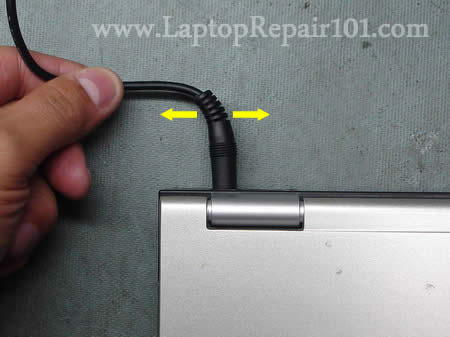
First of all, I tested the laptop with the battery removed. It turns on and runs properly from the AC adapter but as soon as I start moving the connector inside the jack the laptop shuts off and it loses power immediately.
If you have a problem like that, most likely it’s related to the AC power adapter or the DC jack.
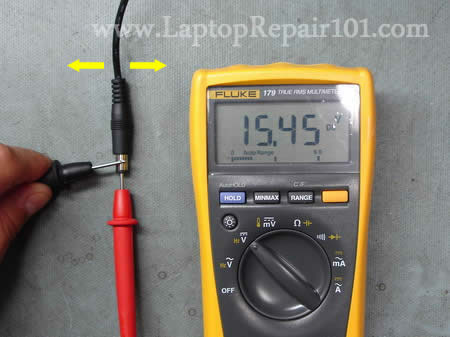
First of all, I tested the adapter with a voltmeter. The power didn’t cut off no matter how badly I wiggled the cord. I was reading 15.45VDC all the time. It helped me to make a conlcusion that there is nothing wrong with the adapter connector or cord and most likely there is a problem with with the power socket inside the laptop.
The next step was the DC jack inside the laptop.
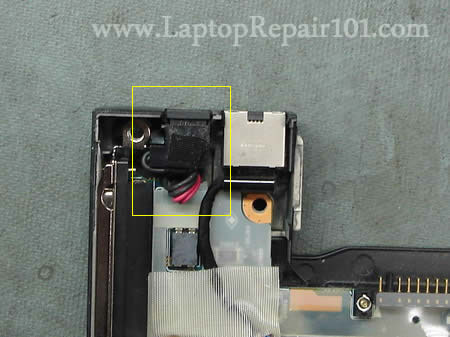
In order to access the jack I had to disassemble the laptop and remove the top cover assembly with the display.
You can find disassembly instructions for most laptops in their service manuals.
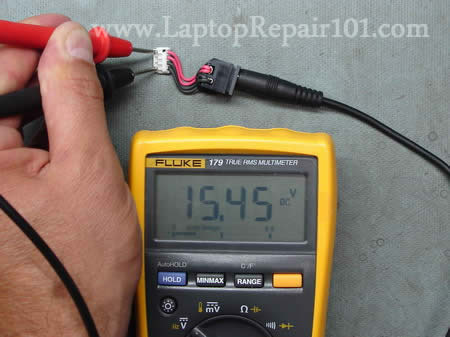
In my case the DC jack was attached to a cable and I easily disconnected it from the motherboard. I tested it with the voltmeter as it shown on the following picture.
When the adapter cord didn’t move, I was reading 15.45VDC.
But as soon as I started wiggle it, the voltage dropped to 0VDC.
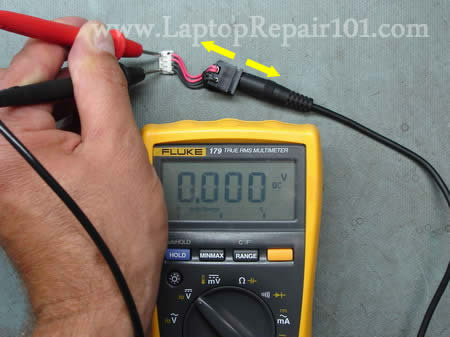
The DC jack harness is defective and had to be replaced and the new one fixed the problem.
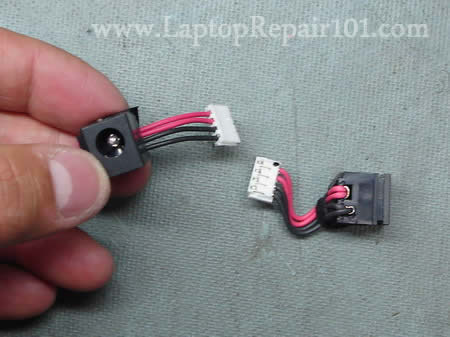
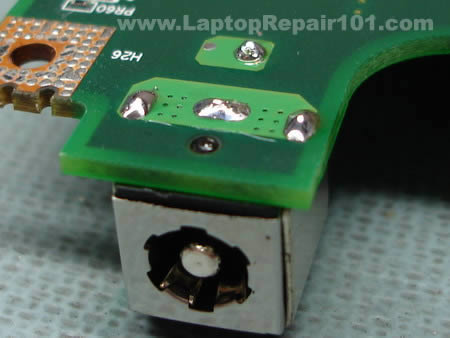
In some models the DC jack is soldered to the motherboard.
If the battery stops charging when you move the adapter plug, test the AC adapter first. If it pass test, replace the jack.
102 Responses
Faraz
Thanks a lot, this is great stuff, but this does not solve my unique problem. I explained my problem in a comment in your previous post.
Should I even then disassemble my D610 and check the DC IN port? as when I connect the ac adapter the laptop neither charges nor discharges, and when I click on the battery icon I get : 2036:34 Hours remaining…
Can you please figure out what may be causing this?
Its not the battery as today I tested my laptop with another battery from a friends D610 and I got the same error, I also changed the charger but it did me no good.
cj2600
Faraz,
Remove the battery and start the laptop from the adapter. Wiggle the power plug a little bit. If the laptop shuts down when you move the power plug you should check the DC-IN port. If the laptop runs fine, apparently there it nothing wrong with the DC-IN port and it’s not necessary to disassemble it.
Will the battery charge when the laptop is turned off?
Here’s what you can try.
Try discharging and charging the battery. Run the laptop on the battery power until it’s empty and then charge it up.
Do you have any Dell utility for recalibrating the battery? Try recalibrating the battery.
Try reinstalling the power management software.
If it’s not the battery or the charger then most likely your problem is related to the motherboard. Apparently there is something wrong with the charging circuit.
Also, you can try reflashing the BIOS. Carefully read instructions before you reflash the BIOS.
Sanket Chauhan
My power cord was broken and I cut the wires and reconnected them again. It was working fine but then one day suddenly the laptop went off. Now my battery is not charging on my laptop. But when I put the battery on on my roomie’s laptop, I can charge it. Furthermore, If I remove the battery from my laptop and use adapter, I can’t turn my laptop on. It is able to switch on ONLY when
1) Battery is in
2) Adapter is plugged.
Even then, the battery is not charged. Nor does it get discharged. The laptop follows all the power options for my battery settings. Even the icon on right bottom shows that my laptop is running on battery and doesn’t show any DC power. But again, my battery is not getting charged, nor does it get discharged.
Now what?
TheKookeh.
Quick note.
When doing warranty validation, 99% of vendors will replace a defective solder joint, but will not replace a defective/damaged jack. Best way to test is by getting a pen or a paperclip and seeing if you can make the internals move around. On rare occasion, an internal will break in such a way a customer couldn’t have done it, in which case, they will cover it 80% of the time.
Richard K
Interesting-why don’t they cover the jack?I haven’t yet phoned DELL with my problem. My symptoms are if I wiggle the DC connection the laptop’s (XPS M170) internal fans come on, screen goes black and it shuts down. I have just purchased a new battery and my charger is also new.When I take out the battery and wiggle the connection it shuts down. It will not restart.It then takes a couple of hours to reboot.When I hold down the on button, with both battery and power supply in, the lights come on, it attempts to powers up, the Wifi lights come on, the Hard disc spins up, the keyboard lights up but it will not power up. When I take out the battery and the power supply and then replace them again there still is no reaction, even though I have a green battery light.Looks like it is an internal jack issue but it still charges the battery, which is different to the problem already posted. I cannot understand why the laptop will not switch over to battery even if it’s a jack problem.Also, when I first put the new battery in, it locked up and shut down after 15 minutes.This happened twice but the battery still charged. It does not seem to be an overheating problem because I clean out the fins with an air cannister regularily.
Russ Giles
Dear Sir,
I have a HP NX6325 about 2 years old. The battery does not charge. I have bought new battery and tested charger and both OK. Any advice as to what the problem is?
If it is the DC socket, what is the part number, and how easy it to fit?
Could there be another problem like a dry solder.
Any advice welcome.
Thanks
Russell
Busari Mayowa
Dear Sir, Please I have problem with my Laptop battery, I but it in brand new, but my brother stated using it without charging it in the new hours it went off totally, after went off I was try to charge it, it was not charged at all, but when I try to use it with adapter the system is ON, but it’s very risk for me to be using it without battery, please sir, how do I solve this problem, your advise is needed urgently.
Thanks,
MAYOWA
cj2600
Busari Mayowa,
Did your old battery work properly? Why did you replace the battery? The old battery didn’t charge either? Maybe you have a problem with the motherboard, not the battery.
Check out the BIOS installed on your laptop and then go to the manufacturer’s website and find out if there is a newer version available for downloads. Try updating the BIOS if needed. On some Toshiba laptop a similar problem was fixed by updating the BIOS to the latest version.
Chris
Hi,
I have a Gateway 8510GZ, it runs on the battery fine (or til the battery is out of power). When I plug in the power, no charging and can’t run off the power.
Taken apart the laptop, tested the DC jack with a Fluke. Wiggle test shows no connection issues, getting 19VDC at the DC jack. Also tested power across DC jack to battery connections on the motherboard and there is VDC going to the battery connections.
What could be causing it not to charge or run off the DC power??
thanks,
Chris.
Renee
I took my HP laptop into a repair shop to have the DC/IN power jack replaced. The computer would turn on and function fine only if I had the power cord bent at a certain angle when I took the laptop in. I received a phone call from the repairman, “We replaced the jack and we still couldn’t get the computer to turn on. We think your motherboard is fried.” I think it’s fair that I pay the $30 part fee, but is it fair that I pay the $90 labor fee if the repairman “fried” my motherboard in his attempt to install a new jack?
Thanks,
Renee
cj2600
Chris,
Will it run from the power adapter when the battery is removed? Maybe the battery is shorting something?
Also, I guess it still could be related to the power adapter. Maybe it’s not working properly under load. Can you test the laptop with another adapter?
If not the battery or adapter, then most likely it’s the motherboard problem.
cj2600
Renee,
That could be related to the power jack OR power adapter cord. It’s possible that one of the wires inside the power cord was damaged and you had to bent the power cord in order to make the connection.
Did you ask the repairman if he tested the power adapter? Maybe your adapter is dead?
Sue
My computer would only work when I fiddled around with the adapter so that it was at a certain angle. After a while, that stopped working as well. I had this problem before and dell sent me a new adapter. Is it more likely that the problem is with the jack? Will a new adapter (much cheaper and easier to obtain) solve the problem a second time?
Robbie Ogburn
Do you have any tips for using a multimeter with an ac adapter? As in, the correct placement for the red and black leads?
darren warren
Is it possible to connect the power adapter directly to the battery terminal as my laptop runs on battery but not on the mains.
pcmemoirs
I came across a similar problem with an acer travelmate laptop. I tested the power cord first and found out that it wasn’t faulty, but it was damaged in the process (don’t ask how :))
I found a Toshiba cord with the same plug and it looked like it supplied power – although with interruptions, as before (and in your example). My question is, do you think I can keep using the Toshiba power cord if I replace the power jack (DC in harness). The voltage is the same, but I’m not sure about other specs.
Thanks
maggyni
some of the circuitry of my motherboard has come off where the power connection goes, would it work if i connect my power supply through the battery terminals (with batterys removed) the laptop is a packard bell E2316
cheers
Maggyni
CAMILO LOPEZ
I have a hp laptop ze5155 pavilon, weeks ago I did a BIOS uptate but I think than install the program wrong, now the laptop no have image, does not display the HP logo. Please I need your help to know how I can fix it and reinstall the original bios of the machine
thanks
cj2600
CAMILO LOPEZ,
I don’t think that you can reprogram the BIOS at home. Sounds like your bios is screwed and it’s necessary to replace the motherboard.
Michelle Hann
I have a laptop that won’t register the cord. I took out the battery and it runs fine off the cord, wiggling it doesn’t affect it at all. For a while we’ve had to wiggle the cord to get the computer to register it, but now it won’t at all. It says its plugged in, but it won’t charge, just keeps the battery at the same level. Any tips?
OAR
MY HP 6710b has a similar problem, it will not charge the battery for awhile now. Running on ac power it started intermittenly shutting off and on. At times you can apply force in a pinching movement and the laptop will get power. I have tested the adaptor and it reads good and I can not get it to change at 19v-20v regardless of the twisting I do. I took it to a local pc shop and they said it was my adaptor, but if it is why is it working sometimes on my computer albeit with a pinch or twist? Is there a reason i would have good voltage but still failing? ie current draw? The adaptors here are about 40 bucks non returnable, so I want to make darn sure it is an adaptor before I buy one. Thanks for your replies ahead of time. OR
Steve Metcalf
I need disassembly instructions for a Gateway m320. I have searched and cannot find any, I need to replace the dc power adapter.
OAR
#22 UPDATE Well i bit the bullet and got a new ac adaptor, and viola the computer boots but the battery is still not charging, could be a bad batt. In all my readings no one talked about the center pin, ie i have a barrel connector with the outside being ground, the inner sleave being around 18.5 volts, which is what i have. However there is a center pin that read zero, with the new adaptor the center pin reads 8vdc, I then took the old adaptor apart and did some voltage checks, and found that the cable connectors had grd, 18.5 and 14vdc on the center pin. Ohms check on the center pin cable to adaptor read open, so i have a bad pin. I will update everyone when i get a new connector, I am hoping that the new connector with 14vdc on the center pin may start the battery charging again. Must be something in the circuitry that needs at least 8vdc to allow the laptop to operate. This is on my HP 6710b Laptop. OR
waterhouse
Someone had a similar question, is there a way to connect the ac adapter directly to the battery input.
tony edokason
i have a computer that dont charge the battery if you plug the adaptor immediately it will come up after some time if you unplug it the laptop goes off when the adaptor is on instead of showing the battery charging icon it will showing direct dc icon on the destop.my question is why all this happen and how can this be corrected i have changed battery without number but all is the same
POS
I purchased 2 AC adapters thinking that it was the problem. If only I thought to test the laptop with the multimeter.
Ka.Ramesh
Hi,
Mine is Dell Isnpiron 6400. I updated the BIOS Version to A017. No the battery on my Inspiron 6400 was not detected anymore. I saw this on Windows Vista’s battery monitor, but also when running the BIOS setup, it said there was no battery plugged in.
The battery charges and the computer switches to using the battery when not plugged in, but I just can’t monitor its state, because even though it works, it is not detected. When running on battery, the battery indicator LED is orange. When charging it flashes green. When charged and plugged it’s off.
Thanks for any help.
cj2600
Ka.Ramesh,
That could be a software related issue. Back up all personal files and try reinstalling Windows.
yass
welcome
dell 1525
vista sp1
my computer is not charging or arrive at 94% and stopped
what can I do
jennifer
I have a Toshiba laptop, and the other week I just lost al charge from my AC Adapter so I could use the laptop. I then purchased another AC Adapter, and the laptop is recognising that I have pluuged it in, however its stating that it isnt charging?! It only starts to charge the laptop one I turn the Laptop off… any ideas? I cant use my laptop knowing that in 1 hrs time the battery will be dead.
filipe
my laptop have a problem like tath but i just have to buy a new charger
stacey
hey i also have a toshiba laptop.. my problem with mines is at the side of my laptop where u r ment to plug in the charger .. but there is no where to plug it in to.. ie there is a hole but no jack thing there to catch on to my charger..wot do i have to do so a can use ma laptop again.. i can still put my laptop on it just wont charge ..
Tamie
I have a Dell Latitude D820 and my puppy chewed through my Dell ac adapter so I bought a universal ac adapter. It works most of the time, but sometimes I feel like I am baby sitting my computer just to make sure it’s still charging!!! even while plugged into my computer the adapter will not charge and the battery will lose its charge…also the adapter has to be moved or jiggled to begin charging again…???? could it be I just got a faulty “new” adapter and need to get a refund…????
Lynsey
I’m having a similar problem in that my Toshiba laptop charger lost one of the prongs. My mom played around with it, trying to pull out the prong that had fallen part of the way into the box, and it seemed to work…until I plugged it in. I looked again and the prong had fallen the rest of the way into the box. What can I do to get it out, or would it be best to buy an AC Adapter, as mentioned above?
Lalit
Sir, I am facing a very unique problem, I have Dell 1525 for last 11 months, from last 3 days battery is not charging full, it started 3 days back, when for the first time after purchased I worked entirely on battery n it drained out upto 15%, after that when I conneted to adapter it charged only upto 63%, I took out th battery n refitted, but then also It was recharging upto 63% only, since yesterday, it is charging upto 15% only, I ve tried all the tips after surfing so many sites on net, but no use, Can I expect a solution from you,
Thanks
Primeonly27.com
I have any number of AC adapters on my site at any given time and they maybe able to solve your problem. Sometimes your laptop repair guy will buy them from my site and sell them to you at a much higher price. This is a good blog with alot of informative information. Thanks for checking out my site Primeonly27.com If I don’t have what you looking for ask for your power supply # / model and I can look for one and when I get it give you a call or notify you.
daniele
Hi I have the same problem, but on the other side of the cable, the one that enters in the power charger.
Could you show me how to open a power charger?I am getting mad with that..I cannot open it. There are no screws or pressure points…
ish
dear sir
i have problem with hp laptop
when i press power button lights comes up for 10 second and cut off
can u help me what is the problem and how to fix it
cj2600
ish,
I had a similar problem with another HP laptop and here’s how I fixed my laptop.
I reseated the video cable on the back of the LCD screen because the cable was half way out.
Maybe you have the same failure?
RYAN
i have a dell vostro laptop it will not switch on the charger light comes on for 5 seconds any idea what this could be
cj2600
RYAN,
Could be bad AC adapter. Could be the motherboard failure.
Ernest
hi,
my hp pavilion dv6000 stop supply power to my LCD inverter board this has result in dim screen. Can you help me fix it.
cj2600
Ernest,
Why do you think there is no power going to the inverter board? Have you tried replacing the inverter?
Dan
Wow. You sure know your way around a laptop. Are you available for consultation in the US?
I have a Toshiba Portege R100 that I have had for four years and I love it. It is so sleek, portable and, until recently, had great battery life with the external battery. I have three problems:
1) The external battery no longer works. When I plug it in, the computer does not recognize that anything happened, even if I do it from a cold boot. I have recently disassembled this laptop, so maybe I did something wrong in re-assembly.
2) The internal speaker no longer works. The headphones work fine, but no internal.
3) The LAN card got fried by a nearby lightning strike over a year ago. No other misfunctions at that time, and I just did a workaround by buying a $20 PCM LAN card.
I know I could go buy another comparable laptop for about $300-500, but i really like this one and would love to fix it.
cj2600
Dan,
I don’t think that this problem is related to the laptop disassembly.
In this model the battery is connected directly to the motherboard.
It’s either bad battery or there is a problem with the motherboard. The only way to find out which one is causing the problem is testing the laptop with another known good battery.
Did it stop working after you disassembled the laptop? Maybe you forgot to plug it into the motherboard?
If the speaker is plugged but doesn’t work, most likely the speaker is bad and has to be replaced.
In a Portege R100 laptop the LAN jack is not soldered directly to the motherboard. It’s on a separate harness.
It’s possible that the LAN jack harness is bad. If replacing this harness doesn’t help, most likely the lightning strike damaged the motherboard.
christina
i have a toshiba satellite m115 and the middle part of the power jack was loose so i would have to put pressure onto the charger in order for my laptop to charge… i guess it wore out and that middle part of the power jack broke off… i was wondering if you have the price range for how much it would cost to repair this.
Lisa
I have a Toshiba laptop. The power cord appears not to be working. I have a Dell cord that I do get power with but the battery life is 1/2 of what it was, which wasn’t much to start with. I’ve only used it once. I’ve looked at all the electrical specs and the only difference is the output. On the Toshiba it is 19v or 3.5 and on the Dell it is 50 or 3.95. Is this cord safe to use or should I get a new cord and battery (since it only has a half hour life span)?
Nabil
I am using an Acer laptop.My charger’s wire has a loose connection.What should I do?Please help.
Azam
Sir,
i have d610 latitude mother board charging pin problem charging jack supply is alright but bios charging pin connection
missed charging pin volts are 2.5, will u tell me please where i will connect jumper with pin on the mother board .thanks
Ernest
Pls my hp pavilion dv6000 laptop can’t charge my laptop battery,i have tested the power jack and all seems.Is there any way i can find where the problem is?
Nadia
I have a gateway mx6214 laptop. When I try and charge it the charging led blinks off and on pink and will not charge. The battery is new so its not the battery.
Liminal
I have a Tecra too, though a different model (Tecra A9) and I’m having a similar problem. Where would I be able to get a DC-in harness that would be suitable for my laptop? The one I would need would require a much longer cable coming out of it
Thanks for the help and the excellent advice given here by the way!
cj2600
Liminal,
I think you can use this DC-IN harness – part number P000484410. Google the part number and you’ll find it.
daft punk guy-manuel
i wish this applied to mine but i need a new battery, so what your saying is like foreign to me.
Michelle
I had purchased a new external power supply (mine was chewed on by the cat). It worked great for a few days then the internal power supply was loose so I followed these directions . YAY laptop is as goos new. Thank you thank you thank you for your help.
Lila
The charger for my Dell Inspiron 6400 has broken plastic very near the big block part (I don’t know the name for it; it’s the part with the little light). The plastic/rubber has broken and I can see the shiny metal fibers inside. When I plug in my charger, the LED light flashes once, very briefly. For a while, I was able to manipulate the cord and, after several attempts, the charger would magically work, so long as I didn’t move the damaged area. Recently, though, I haven’t been able to get a working charge; it only flashes its light when I plug it in.
This problem seems fixable to me, considering that it works if it’s in a certain position, and still manages to light the LED once every time I plug it in. Do you have any ideas on how to fix this? Could I just find a replacement for the plastic/rubber surrounding?
jarrod
thank you very much i might not be able tx my acer myself but aleast i understand the issue, however it has gotten so far gone that now even wiggling the cable wont allow it to charge, im writing this on my last few moments of battery actually, hopefully this will work,
im unsure of where to find the parts to replace however. i am working with an acer aspire 6530g if you could email me any help, its greatly appreciated
chribonn
i had been playing with the power cord for this last week and i alway managed to charge my laptop today in an instant it just stopped i don think it s the chareger beacuse it makes electric sound from inside i think it s the inside of the terminal ……i don t know how to fix myself but i will go to a store tommorow
thx for your advice
junebug
If I bring my computer to be fixed, about how much will a fix like this cost? Is it worth fixing a 3 year old laptop, or should I invest in a new one?
john
My charger is dead how to fix this mess
cj2600
john,
Dead charger? I guess you’ll have to buy a new one. Laptop chargers not designed for repair.
T
How do i get my laptop screen to stop flashing?? i changed the adaptor 3 times and the replacement one works fine for like 3 months and then it starts to flicker again?? and the wire connected to the laptop gets really hot as well?? please help!!
cj2600
T,
How it flashing? Is it switching from AC power to battery power and because of that screen changes brightness?
If you think your problem related to the AC adapter, next time make sure to buy the original factory replacement, not just a compatible third party adapter.
Sierra
If the pin of the DC-IN power jack came out, what should I do?
1. replace the power jack?
2. resolder the pin into the power jack? How can I do that?
Thanks a lot!
cj2600
Sierra,
It depends what laptop you have.
In some laptops the jack is soldered directly to the motherboard, in other models it’s attached to a harness.
What is your laptop model?
Greg
I have an Inspiron 6400, original 65W adapter and on second battery 6-cell which I’ve been using for a little less than a year.
It is stuck at charging at 7%. It was stuck at 12%, but in trying many fixes, I ran on battery only for a while which decreased the charge in it.
The bios recognizes and identifies the AC adapter and the battery. The bios and Dell Quickset state the battery is operating normally, but the charge does not increase.
Only one 1/2 lights come on when I press the battery button.
I have reset the bios to factory defaults, and tried other tricks mentioned in the Dell forums, i.e. jiggling wires, holding power button down, disconnecting power and battery in different order then rebooting, doing the same after removing ACPI battery from device manager.
I have not reinstalled the BIOS. I am already running the latest A17 BIOS.
I did not automatically purchase a new battery or ac adapter yet, because supposedly, they are functioning ‘normally’?
What should I do next?
Reinstall the A17 BIOS?
Buy a new battery?
Buy a new AC charger adapter?
Something else?
cj2600
Greg,
If you have the latest BIOS installed, most likely reflahsing the BIOS will not help.
If the laptop runs fine from AC adapter with battery removed, most likely the AC adapter operates properly.
I think it’s either bad battery (more likely) OR possible motherboard failure (less likely).
I think replacing the battery is your best bet.
Jorge
Hi,
I’m so sorry for asking a question on an old post, but after hours of research this site seems the only one to really know their stuff.
I have a two year old toshiba laptop. I’ve used it A LOT. After I lost my 1st charger, I bought a generic one. I lost that one too. The thing is after my second one all my other chargers (my current one is my 5th one) stop working after 2 months!!! Now I started getting a “Consider replacing your battery” from Windows 7.
My question is: Is this an internal hardware problem? is this a battery problem? only a charger problem? or what? … I’m just very confused because I have no idea what to do and I don’t know if it’s smart to invest in another battery just to see another charger last for only 2 months.
Really appreciate the help!
cj2600
Jorge,
It’s hard to tell what is causing all these adapter failures BUT I would really suggest using an original factory replacement adapter, not a generic one.
It’s possible that original factory adapter will work properly for a long time.
Make sure you have the latest BIOS installed on your laptop. Updated to the latest version if possible (make sure laptop runs on AC power while updating the BIOS).
Not sure what’s going on with the battery. Try discharging it completely and charging again.
john
hello, i have a microsoft, windows XP Laptop, home edition,versoin 2002,service pack 3. Recently ive been having problems with my usb drives and scanners. My power plugin is not responding unless i wiggle it to a certaint spot, but everytime when the power cord is not respinding a send it in to get fixed since its under warinty. Though, the same problems (listed above) keep on happening over and over again. So my quistions to you are: should i just buy a new laptop? should i fix my XP laptop manualy? Or should i simply call the acer company on the phone to actualy fix it so i wont have the problems again? please awnser these quistions clearly and thankyou for reading this.
John
I’ve read your article and it matches problems I have been having with my HP Pavilion dv4 laptop. For a long time the charging cable would sometimes not work when plugged in, and have to be coaxed in at the right angle in order to work. However now I cannot seem to coax it for love nor money.
I assumed that the cable was at fault but have tested the adapter and it is pushing out a stable 19.8V which should be fine. The laptop is not charging though, instead the LED flash is indicating it is getting insufficient power.
Is there any other test I can do on the cable adapter before stripping the laptop to pieces? I’m not to keen on doing that (but I’m going to anyway) but would appreciate your thoughts.
Happy New Year as well.
Romya
Dear sir,
i have lenvoY410 Model laptop,i have battery problem,when i connecting adapter,it shows charging symbol,but symbol of pluged in,but level of charging not showing.if i disconnecting my adapter it becomes shutdown directly,what is the problem,how can i solve this problem?please help?
thank you
James
Hello,
I am 13 years old. I got a laptop for my birthday, I seem to have bad luck with them breaking so quickly. This is my third.
My PC stopped recognising my old charger and wouldn’t charge(Dell Inspiron 1564). I purchased a new one that has worked fine… till now. The charger only works at a particular angle.
There is a light on the end of the wire(hard part that connects to PC) and it only lights up/ charges while in a particular position. I hate using battery power because I always think; Please don’t run out!.
There is nobody I could ask to look at it other than the shop wich will probarbly charge me a lot of money =(. I could have asked my Dad but he died a few years ago.I tried your suggestion of taking the battery out and turning it on but it only works at an angle. When I put the battery back in it made a crackling noise! Last time they charged us £90 for a new charger and I think it will be more now. Untill I get a chance to have it looked at, will it damage my PC to use the charger? Is there an alternative to a new charger? Though there is a light that goes off, is there still a chance that it is the laptop?
Please reply to my E-mail because I may forget to check this site again.
Cheers,
James =)
P.S. Just want to say I hate the london riots and was not involved in them, so dont think stupid teen probarbly on drugs and stuff, I hate those people and avoid them).
John M
Have a hp laptop where the two leds either side of the power jack only remain on for 2 seconds and then the laptop does nothing at all. Have tried a known good power unit.I suspected the power socket and have done all the usual tests with the MoBo in bareboard state. I am quite competent electrically but am stuck with this one.I have re-seated the processor with fresh compound. However as the pc booted just once before dismantle without the battery and allowed me to shut down properly I was convinced it was the jack. It’s a colleagues pc and has been causing trouble for a while I believe. I suspect the outer contacts of the jack are not perfect now from repetitive use but that clearly is not the primary cause. Any hints would be much appreciated.
josh ford
i had this problem with my samsung laptop first time it broke i had it fixed and battery dosnt even charge on it any more and recently the chargers gone again is there any way i could wire a new connector to it like the one used on lawnmowers the 2 pin cable connector just wire 1 side up to my laptop charger ( mains) and hav say a inch of wire coming owt my laptop with the other conector on it then use hot glue to keep wire secure (inside laptop)
Cansda7
If you go to home depot and buy a small clamp for $1 you can pull the cord along side the laptop and clamp it wa-laa is now charging fine.easy fix but kinda ghetto. But for me works just fine! cheap and easy
dee
I have a hp 2049wm dv4 it will not power on I took out the battery and plugged the ac adapter in still nothing all is see is a white light where the lighting bolt icon is please help btw ac adapter is fine any suggestions
cj2600
@ dee,
If I understand correctly, the laptop turns on but nothing appears on the screen. Is this correct?
First, I would suspect memory. Try removing memory modules one by one. Test the laptop with each module separately.
Prashant
hello friend,
i just want to discuss problem which i facing with my COMPAQ PRESARIO7 laptop. i just plugged in power supply and try to turn on but screen blink just a moment and darked again. it dosent turned on. charging indication is on. would you like to help me?
cj2600
@ Prashant,
Turn on the laptop and take a closer look at the screen. Can you see a very faint image?
Also, test your laptop with an external monitor. Can you get any image on the external monitor?
vagalo
I have a DELL Inspiron 1525 and I have been using it for 3 years. Recently my battery is showing ‘Plugged in,not charging’ . What is the cause of this?
battery is good charger is good, pls help.
Thanks
Thabang
I have fijutsu laptop it just went dead, i have tested the charger an its fine,when i plug the sametimes it show’s the battery light sametimes not ,when you switch it on it does’nt light at all,what is the cause of this and how to fix it.
Thanks
Dean
I had a “low internal battery” warning on my hp dv4-2049wm
the extenal battery stopped charging when I got the message. So the compter has needed to run plugged in for the past few weeks. Today I turned it on and while I was working it just shut off (hard boot style no shutdown). I’ve worked on computers all my life and have never seen anything like it. I think the newer hp’s are more dependant on cmos info than computers of the past in relation to power handling and have found other users threads also supporting this theory. I’ll be replacing my battery and letting you know if it works. I have a good feeling it will.. especially since they’re not the standard 2032s anymore, though they look like a 2032 in a cheap platic proprietary casing
Kelly
Had the same problem with my Toshiba Tecra m2. Bought a new dc jack and the connector doesn’t match my original. The wiring seems backward as well. When I look at the end of the connector, the pin holes are closer to the top of the connector and on the replacement they are closer to the bottom. It seems I can’t just flip it since the red wires should match port-wise to the original configuration.
Arggg!
joe
nice guides.thank you.
brian thames
hi my hp laptop comes on but when it does the screen is completely white that you can see anything. you can here it but can’t see or click on anything. so i was wondering could you please help me
Muhammad
hey , i have dell lap top some times my display just go off/ some times turn into white but still sound works. first of all i thought my lcd or vga got out of order but my friend said leave it for 3 days … it is due to some thing like HUMMING on your mother board which affects display. My problem solved.
78 deeIF : you know how to use MULTIMETER then i sure your 99% problems solved. de-assamble your laptop check you power circuits by multimeter. (i m taking technical classes of laptop trouble shooting today is my 3rd class but i believe multimeter can solve 99% problems and you must know abt scrap laptop for replacement of ICs.)
Usman
Very nice guide … have same problem with my HP DV3, will give it a try. Thanks a lot.
om namo shiba
I want see the scamatic ways of hp laptop battery chairging ways from mother bord .Thank you.
cj2600
@ om namo shiba,
What is your HP laptop model number? Maybe I can find it for you.
Paul Orok Ephraim
I am using Acer aspire 5920 Intel core 2 duo.pls I will love to know may be is it good to change the ram to a higher one and the hardisk.pls it important
William Adams
I would like to have the schematic for my Presario m2000 cto laptop. I have a charging problem and need to fix it. I have replaced the power supply, battery and the power jack and it still will not charge. If I use the charger and battery in my Pavilion DV5000 which uses the same battery and power supply it will charge to 100%. The M2000 will run with the ac or battery, it just will not charge the battery. Compaq Presario M2000 s/n cnf5170swb p/n pq660av. Please advise as to where I may obtain the schematic.
Bill WD8OSJ
Benjipally
Plz my hp iz nt displaying on screen. Any sol.
cj2600
@ Benjipally,
1. What is your laptop model?
2. Does your laptop turn on at all? Any lights when you push on the power button?
3. Take a closer look at the screen. Is it completely blank or you can see a dim image?
Md faiz
DC jack harpness is defative and had replaced and the one fixed the proble solution
MUHAMMAD IMAM
I ALWAYS HAVE THIS CHARGING PROBLEM, BUT WITH THIS GUIDE THINGS BEING OK WITH ME
mike
I have a sony vaio vgn-nr220e and I am not gettting no power from it or no lights at all
cj2600
@ mike,
Same advise as I posted on InsideMyLaptop.com 😉
Javier
I have a gateway laptop in which the dc input harness was damaged and I replaced it…now when the battery is in place the charging indicator light only turns on sometimes if I leave it plugged in while the light is on the battery charges fine but if I unplug the power cord and plug it back in the light won’t turn on and it won’t charge and also the light on my ac adapter will dimm in and out…is this the battery or charging circuit causing the issue?….
adawe
My laptop is a toshiba satellite when I plug in my ac adapter and I turn on the laptop he kills the ac adapter after few minute
piyas
Hi,My little sister connected a usb mouse on LAN port. At that time my laptop was switched off and charger was connected. But when I push the power button laptop can’t get the power my charger showed a short circuit error. what’s the the solution?
cino
plss help me oo!
my Dell latitude 2100 mini got half burnt maybe….
i plugged in a HP CHARGER OF SAME JACK-PORT” it couldn’t charge it, no signal at all, then i plugged in my original charger” it didn’t charge also. i was now realizing that the HP charger i plugged into it at first…has damaged the charging system.
The Battery is powering the Laptop but as soon as it gets low i won’t be able to charge it again.
When i pull out battery and plugged directly the charger, n try turning it On, it shows very short blue light and turnoff immediately.
pls is there another way to go about this without spending much…on parts buying.