
The screen started showing strange or wrong colors. What could be wrong? I’ve been asked this question many times and today I’m addressing the issue.
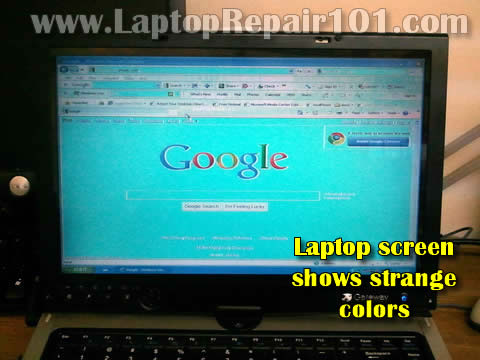
In this post I explain some basic troubleshooting techniques in case if your screen started showing strange or incorrect colors.
You have to know how to disassemble your computer in order to use following troubleshooting techniques.
TEST WITH EXTERNAL MONITOR
The main troubleshooting step is testing the video output on an external monitor (or TV). You can connect your laptop to an external monitor using VGA cable, DVI cable, HDMI cable or S-Video cable, it depends on a type of connector you have.
Most models have a VGA connector, so it would be the most common way to connect.
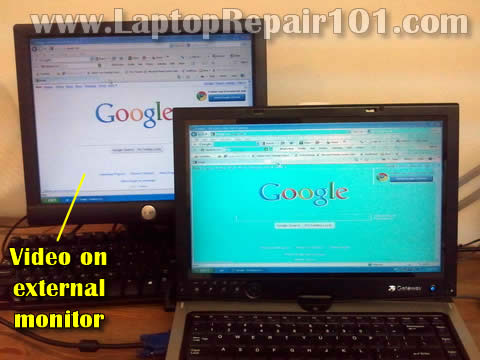
Some laptops detect external monitor automatically and start showing image on both screens right from startup.
Other models can detect the monitor but display image only on one screen (internal or external). In this case you’ll have to switch video between internal and external using the Fn key and one of the F* keys in the top row of the keyboard. This combination varies for different brands, for example it’s Fn+F5 for Toshiba, Fn+F4 for HP, Fn+F8 for Dell, Fn+F7 Lenovo etc…
WHAT VIDEO ON EXTERNAL MONITOR CAN TELL?
If both, the internal screen and external monitor (or TV) show strange or incorrect colors or any other image distortion, this is the graphics card failure.
If only the internal screen shows bad video but external image appears to be normal (as in my example), the problem is somewhere inside the laptop display. This could be bad connection, bad LCD cable or bad LCD screen.
Let’s narrow down the problem one by one.
TRY RESEATING LCD CABLE CONNECTOR ON MOTHERBOARD
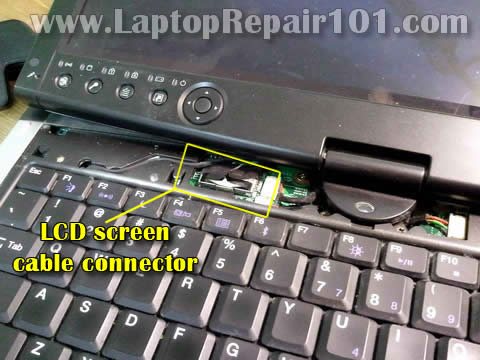
The screen receives data signal from the motherboard via LCD cable. If the LCD cable not making good connection with the motherboard, it might cause image or color distortion on the screen. Try reseating the LCD cable connector and see if it fixes the problem. Make sure the LCD cable connector plugged correctly.
In most laptops the LCD cable connector located under the keyboard bezel (aka keyboard cover). If it’s not there, most likely you’ll find it somewhere under the keyboard.
WIGGLE THE LCD CABLE
The LCD cable runs inside the display panel, under the screen. For this test it’s necessary to disassemble the display, so you can access the cable.
A pinched or damaged wire inside the cable also can cause color distortion.
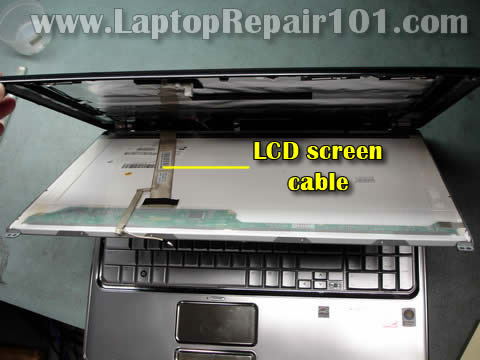
Wiggle the cable while the laptop is running. If moving the cable affects image on the screen in any way (it starts shown different colors, lines, or image clears to normal, etc…) most likely the cable is defective and has to be replaced. Try replacing the cable.
On the other hand, if moving the cable doesn’t affect image at all, most likely the cable is good and you have a failed screen. In this case you’ll have to it with a new one.
APPLY SOME PRESSURE TO THE DISPLAY
Try applying some reasonable pressure to the top part of the display assembly. Squeeze it with your fingers.
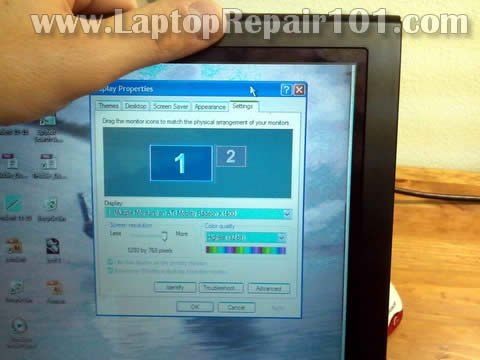
If the screen starts showing different colors, lines, or clears to normal when you squeeze the top part of the display panel, most likely this is screen failure. In this case you’ll have to replace the screen.
Also, you might be interested in the following posts:
Troubleshooting backlight failure.
How to test screen inverter.
Bad video on the screen. What is wrong?
Fix video problems.
125 Responses
Eddie
OK, my laptop started showing some random characters all over the screen. It’s even before Windows loaded. The characters appear when I turn on the laptop on the background where logo displayed and it looks like these characters forming vertical rows.
After reading your post I decided to test it with my desktop monitor and found that external image also has same characters and some strange lines. Does it mean the video card is bad?
David Dennington
i checked lcd connection ect and it returns to normal when i hold either side of the laptop bezel left and right side and apply pressure to it, but not at the top like you mentioned is the screen fixable or does it need replacing? i would appreciate your advice
regards Dave
cj2600
David Dennington,
I think this is LCD screen related failure. Try replacing the screen.
cj2600
Eddie,
Yes, it sounds like the graphics card failure. In most laptops the graphics card integrated into the motherboard and cannot be removed or replaced separately. In this case it’s necessary to replace the whole motherboard. Probably not worth repair.
Fred
A screen may show wrong colors if it has been constantly exposed to an adjacent magnetic field effect such as music system speakers. This problem is so difficult to fix.
cj2600
Fred,
Are you talking about laptop screens or CRT monitors?
giuseppe
Hi I have a laptop with no backlight on the screen …. the screen is visible against the light and therefore the possible causes are either the inverter or lamps … I wanted to try to understand how I can identify the fault if it is in one or ……. thanks for another reply soon
cj2600
giuseppe,
Screen inverter and backlight lamp have very similar failure symptoms – the screen light goes off but you still can see a very faint image.
Which one is failing, the backlight lamp or inverter? You cannot tell without testing your laptop with another working screen or inverter.
If you have to guess, try replacing the inverter board first.
I covered this topic in more details in the following posts:
http://www.laptoprepair101.com/laptop/2009/05/04/how-test-lcd-screen-inverter-in-laptop/
and
http://www.laptoprepair101.com/laptop/2007/09/05/troubleshooting-laptop-with-backlight-failure/
Tulio
I have tried with an external monitor and the external signal is perfect, so i have checked the cable and it’s ok, the lamp is always on,please check this video and tell me what do you think about it, thank’s
http://www.youtube.com/watch?v=m31X6f3YQv8
cj2600
Tulio,
I think this is LCD screen related failure.
There is a chance of bad connection or failed video cable, but I think this is bad LCD.
Just in case, I would try reconnecting the video cable on both ends, just to make sure it’s not connection related problem. If it doesn’t help, try another LCD.
Alex
My laptop shows a distorted image output on the LCD but the signal to another monitor is good. A cable replacement didn’t work, and neither did the LCD replacement. Is there a chance that the actual connector on the motherboard is bad?
cj2600
Alex,
Yes, it’s possible but this is not a very common failure.
Take a look inside the connector on the motherboard. Maybe you have a damaged pin inside the connector.
enrique santa cruz
Hi, my laptop Acer travelmate 4220 sometimes hangs with visual artifacts displaying very fast, like huge horizontal bars. After that it refuses to reboot until I remove the batery and start pating its back like a baby. I have replaced the memory with no permanent success, Could you help me?
cj2600
enrique santa cruz,
This could be graphics card related failure. Can you test your laptop with an external monitor? Do you get same problem on the external monitor or it appears only on the laptop screen?
JIM
Hi, I upgraded to a led from an lcd, increasing resolution from 1366 to 1920. it worked at first, but i couldn’t close the lid because i put the brackets on backwards. so i fixed the brackets issue and then it had fast multicolored horizontal lines, so, i attempted to make sure all fource different connections were firmly seated…now the screen just seems completely dead. no light no nothing, but the laptop will output video fine on my old screen when i hook that back up. jiggling the lcd cable doesn’t do anything. i did unplug the main cable from the motherboard when the laptop was on…maybe that blew something? now i don’t know whether to send in the lcd cable or the led/lcd screen in for replacement or both? i have a multimeter, can i test one or the other somehow?
thanks,
Leon
Hi, great site. the signal in a external monitor is perfect, and the ONLY problem i have is that the color black i show with red vertical lines every where in the screen, but only the black color, every other color looks fine.
i a move the screen or make pressure on the lcd does not seam to make any difference.
Thanks.
Jagpinder S Brar
In my laptop LCD screen cable got burnt and I need to replace it. Can you please tell me from where can I get this cable for HP dv4t-1500?
Mario
Hi, Thanks a lot for this info. I ryn into a strange problem. A friend of mine asked me to fix his laptop with broken screen. It`s LED. I replaced it with a new one, but when I turn on laptop the screen seems to go in check mode displaying only black, white, red, green, yellow screen. The screen is filled with one colore at a time. No other mumbo jumbo. When I connect laptop to external monitor all is fine but internal LED screen shows only those test screens. I think it`s a bad LED display or should I look somewhere else. Thanks for help.
cj2600
Mario,
Maybe your new LED screen is not 100% compatible with the laptop. Also this could be bad screen.
john l
Hi, My laptop just started getting pink colors where the blacks were and green where the whites were so i tried tilting the screen down a little bit and the colors went back to normal. Now yesterday when I turned my laptop on, the screen was gray with weird colored lines in it, then all of a sudden green streaks ran down the screen. When it got to the log in window the colors were green and pink and blue and all diffrent things all mushed randomly together. Can you tell me whats wrong and/or how to fix it?? my laptop is an HP G60-235DX.
Jochem Visser
I have a panasonic Cf-52 with a cracked screen.You could still see some of the desktop features, like a moving window and the colour changes during start up. Worked fine on external monitor………so I ordered replacement screen based on the Sharp LQ154M1LW1C which was in there…..new one came (samsung one compatible according to the company with the Sharp) and this came on very slowly and showed some stripes and blue surfaces…..so assumed is was a faulty one….so got another replacement send but same problem. The funny thing is that part of the screen works on the original cracked one so I know inverter and ribbon should be ok. Also works fine on external monitor. Could it be that the new screens are not compatible (even tough that LCD4less is adament they are) I also tried the new screen without the ribbon on and screens comes on instantly and is white (as it should be without any data) as soon as I plug in the ribbon it slowly comes up with an image of lines and some blue area’s. Im puzzled and stuck.
cj2600
john I,
It’s hard to tell what’s wrong but I think your problem could be related to one of the following:
1. Could be bad connection between the video cable and motherboard or LCD screen. That would explain why moving the display fixed the video problem the first time. You can try reconnecting the video cable on both ends. Reconnecting the cable might fix the problem.
2. It’s possible the video cable itself is bad. Try replacing the cable.
3. Could be failed LCD screen.
Before you do anything, test your laptop with an external monitor. Make sure the external image work properly. If you have same problem (weird colors, lines) on the external monitor, this is graphics card failure. If that’s the case, you’ll have to replace the motherboard.
I hope it’s just bad connection/cable.
cj2600
Jochem Visser,
I think your new screens are not compatible with the laptop. I guess you’ll have to find exactly same screen as the original one.
This is correct. If your old cracked screen still works but two new show same problem, most likely there is nothing wrong with the laptop itself. As I said before, most likely new screens are not compatible.
Ben
My question is regarding the model number of the LCD screen if I need to replace it. For instance, my model number on the back of my LCD screen is B154EW01 V.9, which I assume the latter part means Version 9. How important is the version number on the replacement screen if the rest of the number is correct? I have found a B154EW01 V.5, would that work?
cj2600
Ben,
You should contact the seller. A screen with different version number could be different.
Once I purchased a new screen with same model number but different version. The new screen had different mounting bracket locations. I had to return the screen and purchase same version as the original one.
monica
Hi, I opened my laptop toshiba satellite L300D to clean it and went I switch on again I had the screen plenty of stripes I opened again and everything looks all rigth one day switch on again and it was ok but after y touch the screen and i got the stripes again if i conect a external monitor it´s fine
Before open the lapton the screen was ok
I dont have idea what can be
Thanks
Daniel
Thanks for all the helpful information on this website. I have a question about my Dell XPS M1530 laptop. Lately, I’ve noticed the screen having an aqua blue tint and 2 red vertical lines. When I adjust the screen back or front the blue tint and the occasional red lines go away. I also noticed if I push the display backwards where the angle is more than 90 degrees the blue tint comes back. If I tilt the screen forward towards me creating a 45 degree angle the tint is gone and the screen is normal. None of this happens on an external monitor.
Ankush Chander
Hi I have a Sony Vaio Model number VPCEB18FD. When I move the screen it works at some angles and not at others. Recently I took it to a repair shop and the tech there told me that the cable is bad.
The problem that I am facing now is that since the Laptop is relatively new, a replacement cable is not available. It was working at a certain angle before I took it to the tech but now it does not work at all. This I’m guessing is because the cable was moved.
Please help me!!
cj2600
@ Ankush Chander,
Try SparePartsWarehouse. They sell original Sony parts. I would call them to make sure you get the right cable.
kukundakwe richard
HI, MA LAPTOP FELL DOWN AFTER. IT DIDN’T SHOW ANY SIGN OF BREAKAGE BUT AFTER POWERING IT ON, IT POWERED ON BUT SHOWING ONLY A BLUE SCREEN. WHAT MIGHT BE THE PROBLEM?
sameer
my laptop used to get display adaptor failure but then ill becpme okay
now however when i turn it on it shows white,red,green,blue n a bunch of other colours round and round like there no signal received by the laptop
Joe
Hi.my problem is with my dell xps m1530.i was playin a game one day den it suddenly froze.i restarted it,it showd me white horizontal lines totaly coverin d screen.i coudnt see anytin.i connected it to an external monitor,the display was stil bad.d laptop neva fell or got hit.please help
cj2600
@ Joe,
If your laptop screen shows just lines and external doesn’t work at all, most likely this is motherboard (graphics card) failure.
Just in case try swapping memory modules. If you have two memory modules installed try removing them one by one and test the laptop with each memory separately.
Here’s something to try. Disconnect laptop screen cable from the motherboard and test the laptop with the external monitor again. Can you get external image with internal screen unplugged?
Ikenna N
Hi, my Toshiba M70 screen has been flickering. when i severely push down/up the monitor the display atimes normalizes. Please help on this.
Again on the same laptop. some keys “i” and “o” stopped working. recently the “i” key has been behaving as if it is pushed down. it repeated writing “i”. please help on this as well.
cj2600
@ Ikenna N,
Possibly bad connection between the video cable and motherboard.
Try reconnecting the cable if it doesn’t help, try replacing the cable.
You’ll have to replace the keyboard.
Nasiru
when ever i started my laptop d screen alwys start blinking, bt when i move the screen down it suddenly become normal.
Also immidiately i start it the bios setup will first appeer on the screen an stop there. what can be the actual problem of this
Mickey
Just bought a brand new analogue monitor lead (VGA) to connect my laptop to tv for some reason it came up on the tv like a greeny blue colour (laptop screen fine) when its connected so i tried it on another tv same thing happened. any idea’s?
Imi
When I turned on my laptop this afternoon I was shocked to find that the colours on the screen were off, and the pictures were very slow to refresh (like when you freeze an LCD). I suspected the cable, as I had removed it several times while trying to replace a broken hinge, so I stopped the laptop, wiggled the cable a bit and restarted with the result of: a totally white screen. Upon closer inspection I saw that it actually showed several grayish-blue vertical stripes (it booted into Fedora, hence the blue I guess). After restarting and reconnecting all the cables several times with no improvement I connected an old CRT to the lappy and booted into Win7. Now the LCD shows a lot of dark grey vertical stripes (of whatever colour is dominant on my desktop-but changes very slowly) in the native resolution of the CRT. So I have a 1024×768 grey square in the center of my LCD. Any ideas? I’m thinking it’s dead. 🙁
cj2600
@ lmi,
If I understand correctly, this problem appears only on the laptop screen and video on the external monitor works properly.
This sounds like laptop screen failure. I think you’ll have to replace the screen.
Imi
yes, it works perfectly with the CRT. Thanks for the answer!
Steve
Hi,
I have an Advent 9115 that shows a white screen with slowly developing coloured lines on start-up from cold, but is OK with a warm boot. I’ve changed screen so it’s not that, but if I disconnect the cable at the LCD end when the screen is white, then reconnect, it displays fine. Twisting/bending the cable has no effect, just pulling out and reconnecting. Where would you guess: cable or board?
Thanks
cj2600
@ Steve,
Did you test your laptop with an external monitor? Does external video work properly all the time?
If external video work fine, try reseating the video cable connector on the motherboard. Could be just bad connection.
If it doesn’t help, the next step would be replacing the video cable. If still no help, probably this is motherboard failure.
For some reason I think your problem is related to the cable. Either bad connection or faulty cable. Just a guess.
Steve
Many thanks for that. I changed the cable but unfortunately it appears to be a motherboard problem. Still, at least I know now and that leaves me with a good panel and cable.
linda
all my pictures are funny colors.. checked battery ok. blues are green etc.. i can still real mail.. kinda in a negative state
Jie
Hi, I need your help please.
My toshiba satellite laptop suddenly refuses to work. There is only blank white on the screen. I can adjust the brightness with keyboard though. After reading your blog, I think it might be the video cable or LCD screen. Ordered both, and replaced both, it still shows blank white screen. When connecting to external monitor, it works perfectly. what problem would this be? Motherboard? Thank you. Your advise will be deeply appreciated.
cj2600
@ linda,
First, I suggest testing the laptop with an external monitor. If external video works properly and the problem appears only on the laptop screen it could be related to one of the following:
1. Bad connection between the video cable and motherboard or LCD screen. Re-seating connections on both ends will be the first step.
2. Could be bad video cable.
3. Could be faulty LCD screen.
You cannot tell which one is causing the problem without testing the laptop with good known spare parts.
cj2600
@ Jie,
If you replaced the LCD screen and video cable but the problem still there, there must be something wrong with the motherboard.
santhosh
just give a strong pat on the back of the lcd screen… it will come to normal… i tried and it worked….
Msfit
Wow thank you so much! I’ve been trouble shooting all morning. I was about to resort to drastic measures when I found this page. The picture your showing is exactly how my Dell laptop display looks with the white areas a turquoise color. I thought it might be my video card until I hooked it up to external display and saw the problem was not duplicated. I’ve never taken apart the display before but I’ll give it a try as I am Broke!
i.g.pradeep
hello, here my laptop shows 3d effects, looks like i need a 3d glass to work with my laptop. red and green are scarted. what should i do to?
cj2600
@ i.g.pradeep,
Did you test external video? Does it work properly.
This could be
– loose connection between the video cable and motherboard or screen
– bad video cable
– failed LCD screen
Try reconnecting the cable on both ends.
Try wiggling the cable while the laptop is turned on. If moving the cable “fixes” the problem, probably this is bad cable.
cj2600
@ santhosh,
Most likely it will fail again soon.
Mohammad
one forth of my laptop screen(left side of it) has this problem(some colors are different than what it should be, some not). The rest of the screen has a normal color. On an external monitor, the screen is normal. Which part could be wrong?
cj2600
@ Mohammad,
Most likely this is LCD screen failure.
Ivanjerald
I have lcd problems too. The screen has cracks cause i accidentally dropped it…will it still work if i buy vga cable and connect it to another monitor?
cj2600
@ Ivanjerald,
Yes, it should work if there is nothing else wrong with the laptop.
Andy
I have a toshiba L305. The LCD controller went out (if you try bending it, the screen will come back, but you need to hold it in the right position).
The screen type inside was LP154WX4 TL C8. I bought a replacement one from ebay with the exact same model number, only it said it was pulled from toshiba A205. The problem is that after I connected the new one, the colours on it are off – black is red and other colours are different from what they are supposed to be. Connecting external monitor the image is fine.
My suspicion that somehow the inverter is involved. If I also need to change the inverter (although I don’t understand why would it work for the same model screen normally, but on this give off red colours) should I buy an inverter taken from A205 or L305? How do I know it would fit? Thank you.
cj2600
@ Andy,
Sounds like the new screen is defective or incompatible. If the new screen is exactly the same model as the original one but shows wrong colors probably this is defective screen. Really cannot tell without testing the laptop.
No, this is not inverter problem. That’s for sure. The new screen lights up and it means the inverter working fine.
Just in case try reconnecting the video cable. Maybe the connection between the cable and screen is bad.
betty
dropped my new laptop I got for christmas, shattered the lcd screen. I do not have a vga cable. Is there another way to see if the computer is OK, and all I need is a replacement screen?
Thank You
cj2600
@ betty,
Is the screen completely broken? Can you get image on the undamaged part.
If there is no image at all, can you hear normal Windows loging sounds when turn on the laptop?
Rohan Menezes
Thanks man!!! Awesome article. I had the same problem with my Dell Vostro 1400. Just pressed the area below the point at which my screen is attached(just below the hinge).Presumably, this is where the LCD connector is connected. The weird colours went away.
Taylor
Hey, My HP laptop started making weird teal cloured lines and black images show up as blotchy and red. At the end of your article, you said that squeezing the screen could affect it so I tried, and it did. I’m not sure why but when I formatted my hard drive, while it was deleting files, it looked fine for about 20 seconds without me touching it and then it went all wanky again… if i press along the area above keyboard it also changes minorly… Any suggestions?
Vighnesh
hi gentlemen!i have a very strange doubt.on testing the pins of my monitor cable when the monitor is ON,the tester shows the flow of current.is this normal or is there any problem with the monitor?can anyone tell
Sied
I have Toshiba L610 . i have problem in my lcd show under line and close tollbar start windows. i need have solution, how to repair?
cj2600
@ Vighnesh,
What is your problem? Bad image, no image, garbled image? Have you tested laptop with an external monitor?
cj2600
@ Seid,
I don’t understand your question. Does it show a single line on the screen?
Abithu
The connecting place between ma lcd screen and keyboard( ie. The the bottom of bezel is broken. Can i replace it?
ashish
i am having lenovo y510 there was hinge problem in it so that i have repaired thru service centre but after receiving from them when ever i start to play any game ever solitare or if i zoom my photo screen becomes blank fully dark . i have shown it to service station the told me to change the new screen so i would like to know that is this problem of laptop screen or something else?
cj2600
@ ashish,
I would suggest testing the laptop with an external monitor. Connect your laptop to the monitor and start playing a game.
What happens with the external image? Will it disappear the same way as on the laptop?
balistic
hi could you please help with my laptop problem,sony vaio pcg 7164m. works fine except for all white areas of display are showing as a pink tint?? have tested with external moniter and the disply is fine, what could be the cause of this,and how will i fix it.
thanks for any help.
panduranga
hi….. i have broken lcd cable in my hcl me 06… what will be the cost of the cable and where can i purchase in bangalore?? please help urgent….. thanks for your help….
ashish
thanks for ur reply buddy,
i have checked my laptop with external monitor and i now i have found that the same thing is happening to the external monitor too (i.e screen gets blank when i play game or zoom any photo) what should i do. do i have to take it to the service centre or should i do it my self. if i can do this too than how to go abt it.
thanks in advance
cj2600
@ balistic,
Most likely it’s either bad video cable or failing LCD screen. It’s hard to tell which one is failing without testing the laptop with spare parts.
Here’s what you can try.
Take apart the display panel and try moving the video cable while the laptop is running. If moving the cable affects image on the screen and it gets better or worse, most likely this is video cable related failure. Try replacing the cable.
Zoloo
Hi , i have acer aspire 5738z and my laptop screen shows strange colors like this . But i have another problem . Because my laptop is turn on but screen is black . If i try many times to turn on , sometimes it works but screen shows strange colors /push power button 30 sec etc / . So now what i have to do? What’s the problem ? How to turn on screen ? Please help me . Thank you
Moses
I have a Dell Inspiro 1420 and baby had been playing with the keyboard and has distured the screen setting somehow and although i can still see the images,it is on a twilight/fuzzy kind of images showing. How can i return it back to it’s normal or original setting?
cj2600
@ Moses,
Do you see this problem with video only when Windows OS loaded completely or it appears right on startup, even before Windows started loading?
Renee
Hi, I have a toshiba satellite L455 laptop. I accidentally picked it up by the monitor screen ( My finger pressed on the screen)and suddently, I saw black and while lines and circles. What is the problem and what can I do to fix it?
caroline
Hi, my laptop is showing strange colours like above. Unfortunately it’s getting worse as time goes on, i have to tilt the lid in more to see it, moving the laptop can make it flicker back and forth. It also clears when i put pressure on the lid like you showed. I tested with tv and that worked ok. I am confused as i sent it into a shop few weeks ago and they said it was the internal video/graphics card that was causing it (didn’t fix as cost too much) but it works on an external monitor, do you think they got it wrong and that it’s the screen/cable that’s wrong?
ali
my laptop is filckering and shut down what shall i do?
beena prajapati
hi. I also have some sorts of pblm with my laptop,intel del core 2. When i on the power, it shows only white n blue colours n some sorts of lines separating colours. I had tried to format it with bootable window 7 cd thinking that it might have been due to virus but it didn’t show anything. I had removed the battery for some hours by suggestion of my fren bt nthng gona change. I have least knowledge abt it. I dnt have anyother laptop or tv to check on. What can i do? Please suggest me.
shaun
Hi, my laptop is a compaq… I have this problem where my screen is all different incorrect colors, but it is perfectly normal when i hold down CTRL + Shift… So i don’t think something is wrong with anything internal since it fixes itself with buttons… How do i get it to stay permanently normal?? Help!
amirasad
Dear All,
I have same problem exactly my screen is like the image above, I tried external monitor but there is no problem in the external monitor it is just on Loptop screen not just for windows also in Boot area, also I found that whenever I change the setting of battery it become fix for minutes then it backs to the problem, and sometimes it fixes itself again for some minutes, what should I do now?! any help or suggestion?
emmanuel
señores laptop repair tengo un problema con un laptop dell el video se distociona la imagen cual puede ser la falla ,la pantalla o el cable lcd? gracias
cj2600
@ emmanuel,
Test your laptop with an external monitor. If the video distorted on both, the laptop screen and extenal monitor, this is graphics card related failure.
If the video problem appears ONLY on the laptop screen and the external monitor works properly, this could be one of the following:
1. Bad connection between the video cable and motherboard or LCD screen.
2. Failed video cable.
3. Bad LCD screen.
RAJ
My laptop is hp 520.my laptop is showing strange white lines from the time of starting the laptop.there is a fixed line at the top of the screen from the beginning.what is wrong with the laptop????
cj2600
@ RAJ,
Can you see normal Windows image on the screen at all?
I would test the laptop with an external monitor connected to the VGA port. If external video works fine and the problem (lines) appear only on the laptop screen, this could be bad video cable or failed LCD screen.
John
I have a problem with my Sony VAIO LCD screen. Do you think that it is the inverter problem or the LCD screen? Look at this video and see the problem I am having.. youtube.com/watch?v=ef2Eu4MbZ5I also notice that I have connected it with external monitor and it is working normally so I guess it is not the VGA card it must be the LCD screen. Should I replace the LCD screen or the inverter?
ravi kishore
sir, i have a fujitsu siemens laptop. when i on the laptop it on’s but no image is displays on the screen.wat can i do sir pls give suggestions to me…!
Bianca
Hi,
I really need help. I have a new, one week old Asus laptop. Everything is great but the screen – it’s awful. The colors are all off. Everything seems blueish-purplish. On the one hand, many colors seem really garish on internet pages but in videos they are all dull. No calibration helps.
It’s very unpleasant to look at it.
Help.
Louise Ayling
Hi
I have a Sony Vaio Fz model x the graphics card was replaced 2010 & was ok until couple days ago x the
Screen suddenly showed all the colours mixed up together like a kalaidascope x I tried it again today started in safe mode it worked so I restarted x after 10 minutes same thing happened again, colours all mixed up!
Any ideas?
Many thanks
Louise x
Emil Marcus
### TOSHIBA QOSMIO X505-Q720 LCD Cable ###
Please help !
I have a Toshiba Qosmio X505-Q720.
Since the screen shows strange colors and lines depending on the inclination of the screen, I ran the tests your recommended, and found out that the LCD cable coming from the motherboard to the screen and inverter is pinched (wiggling it helped me come to this conclusion).
1. Where can I find the appropriate replacement cable ? The websites you recommend do not seem to list it … actually, very few list Toshiba Qosmio, specifically the X505-Q720.
2. How do I replace this cable ? Accessing just the screen is not enough. How do I access the place where the cable connects with the motherboard under the keyboard (What screws do I remove, etc) ?
Thank you !
Sarah Tushemereirwe
Inspiron Dell laptop logs on well but displays black screen, had to read what is displayed, I have tried to increase on the light but in vain. please kindly help.
cj2600
@ Sarah Tushemereirwe,
Is it an older laptop? If yes, most likely it has a CCFL LCD installed.
When it shows no light, it’s either bad inverter or failed CCFL. I cannot tell which one failed without testing the laptop.
First, I would probably try replacing the inverter.
Pam
Are you still available to help me try to figure out what is wrong with my laptop? You have a lot of good info on this site. I am hoping that I don’t have to replace the screen or laptop. I take care of my elderly in laws and I do all of their business and mine on this laptop. I do not have the money to replace it, so I am praying you can help me. It is hard for me to explain how the monitor is doing, but I do have pictures I can send you. Please let me know if you are still available to help. Thank you and God bless!
cj2600
@ Pam,
You can upload the picture somewhere and give me a link in the comment. I’ll take a look and try to help if I can.
First, when there is a problem with the image, you have to test the laptop with an external monitor. Let me know how external video works.
Ruth
I have an acer aspire 5551. I tried cleaning dust out of the back of my computer by loosening some screws on the back. when I saw it was a bigger job then I was willing to tackle I put screws back, but the compartment under the touch pad was then loose. the problem that developed was exactly like you picture with the external monitor looking fine. when I squished in the compartment door it would sometimes adjust and finally it stayed white until I had the fan replaced. Now it is turquoise again. the tech left nothing loose so I can’t squish the compartment door. He said it had to be a windows or theme problem. So, I am happy to find your site. I will ask him to try these solutions so I can use the laptop without an external monitor. thank you.
cj2600
@ Ruth,
If your laptop still works fine with an external monitor, this is not a Windows OS problem. First, I would check connection between the display cable and motherboard. Maybe it’s just a bad connection.
Praneeth
Dear CJ, This is very urgent and this is going to be a bit long but please have the patience to help me through it.
I have 2 laptops.
1. HP Pavilion dv6700 with failed motherboard (not using now).
2. Sony Vaio VPCEA23EN, where a part of screen is showing some blurred line or blurred column.(which i am using)
Can you tell me best possible solutions for this.
I am interested to know if i can
Relpace LED screen(Sony Vaio) with LCD screen(HP).
My sony laptop is very slow and sometimes it hangs(mouse moves very very very slow)
Can i put ram of hp in vaio..
Also i am thinking of making HP 320GB hard drive into Ext HD..
Please let me know if you did not understand anything..
Mignonnette Daugtherean
dear cj, I have a sony vaio model VPCEB33FD, could you please be so kind to give me some possible reasons why I’ve been having a problem with the colors of my monitor, there is no red, the colors that can be detected are blue, yellow and black. It happened when my laptop suddenly shutdown and when I turned it on a pink screen appeared instead of black in the startup becoming dim. some lines are visible but it will slowly fade away. I’m wondering if it is due to overheating, no physical damaged was done to the screen or the laptop by the way, and I can still see what’s in the monitor but the colors are just those and it’s too dim. thanks, hoping you could help me
cj2600
@ Mignonnette Daugtherean,
First of all, I would test the laptop with an external monitor. If external video works properly and all colors are fine, most likely your laptop has a failed screen or video cable.
I would probably try replacing the screen first.
If the same problem appears on both screens, the internal LCD and external monitor, most likely this is motherboard related failure.
Chris
I tried APPLYING PRESSURE ON THE TOP OF THE DISPLAY (exactly as the picture above) and IT WORKED! Thanks for this! 😀
Amol
I tried last one and it worked… Thanks a lot for this… 🙂
Duarte
hi, i let my laptop hit the floor and the screen got broken, i replaced with a new screen but colors got the same as in this images in this webpage, blue where was suposed to be white. none of the tricks worked so i am going for the screen problema,probaly i am gonna buy a new screen 😐 nice tips anyway 🙂
Duarte
just one thing…like the images above i got blue where is white, also where is black it shows some red rain. but when i change de rgb colors by reducing the red level some of that blue thing where is white disapear, and if i get a black wallpaper in the desktop it still show the red rain unless i put like a dark gray almost black. i know that is no software problema because when i print screens in other computer they dont show color errors,i am thinking that is a bad screen that is not supporting some color…what do you guys think?
Lahcen
Many thanks, it helps me to fix my issue
Rakshit
My sony laps back pannel get cracked .. pls suggest me how to fix it
Ankit Tiwari
Hi sir,
I have exactly the problem you have shown in the image. I have all the blacks red and so on. I checked the lcd screen by pressing on its sides but nothing happened. Also I changed the video cable with a new one, but still no result. I connected it to a external display and the result was normal image. So that’s mean that my my graphics card is good. So I don’t understand what’s the problem because my led is good, my cable is good and also my video card is good. So why is this problem occurring? . Please help!
Anandkrishna R
My Laptop screen shows a decrease in color intensity, especially black. When i pull some notification in Win 8.1 the blue color corrects this temporarily. Immediately when I close the notifications, it goes back to the same blurs. Also the grey screens tend to flicker
Young
I was playing game on my toshiba laptop,i quit the game and i left.I cam back 2hours later the screen has strange colour
Rhonda
Thanks for sharing. My LCD cable was loose in the back of the screen. I reattached it my screen colors returned to normal.
Shubh
I was facing exactly the same problem ie normal display on an external display. After reading this, i downloaded the servicing manual for my laptop model and followed the step by step dismantling and reassembly procedure.
The problem is solved now 🙂
Thank you.
Abhijeet
Hi All,
The best way to resolve this problem is just press left and right screen softly with thumbs and see it will work fine i did it myself and could resolve it
SAILESH
Hi, I have a dell studio laptop and the problem started a week ago, I was playing fifa and the game crashed and a blue screen appeared, some shadowing and caching problem, I restarted it and again while playing it crashed showing the same reason, the next day the laptop didn’t have any display, I googled the problem and dismantled the laptop, removed and cleaned my rams and refixed the LED wire, it didn’t work, den I connected the laptop with an external monitor and it was started working, I ran a diagnostic test and everything was ok, I rebooted and the laptop display was also fine, the next day I restarted the laptop and again there was no display, if I connect to an external monitor and run a diagnostic test everything is fine til the next reboot, pls suggest what is wrong with my laptop and how do I fix it?
Rik V.
Hi guys,
I am experiencing exactly this problem with my HP Pavilion dv8 (It was supposed to be a high end laptop, but in the six years I have used it, I have had nothing but problems with it, mainly due to non functioning of capacitive buttons and batteries heating up and dying).
Now, last week it started getting exactly this blueish color where the screen should be white, and some red flicker over more dark colors. It’s clearly a hardware problem because it’s present both in windows and in linux.
Also, on a cold startup, when I tilt the screen towards the keyboard and glimpse in between, I can see that the screen looks normal. But when opening the screen a bit more, the flicker and color shift start. Now, I have noticed that during warming up, I can gradually tilt the screen more and more, until after about half an hour, the screen can stand upright and I can use my laptop.
Any idea how this can be explained? I tried opening the laptop to look at the cables and contacts, but you really need to be a burglar to get past all the casing. It’s clearly glued together to never be opened.
jenny clayton
hello, you are really kind to help all these people out I will definitely leave you a donation and support your work because not a lot of people would take the time.. I have dell inspiron 14 there are two plastic clips that hold the screen to the keyboard the one on the left snapped off and I have only part of it. so the part I do have I taped back in and there is about a half a pinky exposed. it does run well, but it is a temporary fix. I know nothing about computers.. is there a part I can buy, something I can do aside from taking it apart. because when it comes to computers all I really can do is turn them on. I thank you for your time and I hope you can help me.. I have had it for about four years..
Ali
i have toshiba touch screen// these days its shows red colour small smaal lines around pix//i checked with extrnal led but that shows ok///what i have to do//can i fix it without opening..
Coker
Hi, i dont know if you are still replying messages as per this post but this problem is what i’m currently experiencing with my lenovo G580, one minute i was watching a movie, the next minute i step out to get something only for me to come back and see my screen not showing red and reacting to white(showing pinkish cyan in white backgrounds. Honestly, i dont know what to do because i love this laptop so much. I just hope its not the motherboard. Please i need your sound advice. Really appreciate you for this.
Vickie
Coker, I have a Lenovo Edge 15 and the light started fading all of a sudden and then it turned pink and dull. I restored it to the factory settings and it is now working fine but if this happens again am taking it right back to the store and will go to Apple forthwith.
Jo
Hello, I have a lenovo y50-70. My screen does not display it’s corresponding colors. It is not broken or cracked at all. I used another monitor to see what can be causing the problem and still no clue.
Thanks for helping.
Sourabh
Hello, I’ve lenovo G580. I am suffering with the problem of LCD screen. When the lid is fixed at certain angles, it shows vertical and horizontal lines disturbing half part of my display. But as soon as Lid is adjusted to perticular angle then no such fault occurs. Plz give me suggestion what should i do. If you can, plz share the same on my mail id also. Plz.. Thanq..
Shelly
Thank you so much. My laptop screen was looking distorted and fuzzy after I gently wiped the screen. I thought I was doomed. I found this post and I put some pressure on back of screen and kind of wiggled the computer some, and poof back to normal. Thanks!!!!
orxan
if you replace the plume screen problem will be solved? please help me
jagvinder singh
my laptop show its required a newer video card or one that compatitable with direct 3d
waleed akram
my laptop lenovo g500 is showing red allover. on start screen where is show black screen it is showing red and after on desktop it is showing red color mixed with other colors. what is worng with it.
RUK
Hello,
My laptop Satellite L645-S4102 was working fine until recently the screen is blurry (everything works fine but after reading texts or even stare at the screen just for a little while, you get nauseated). I connected an external monitor and the display is crisp i.e. we can rule out graphics card problems. I opened up my laptop and see if it is a cable problem but everything looks okay. So I’m left with LCD or Inverter problems… so how can I test the faulty item so that I can replace it myself
sincerely