
In this post I explain how to repair broken touchpad cable connector on a motherboard.
Let’s say you were fixing a laptop yourself and accidentally damaged the touchpad connector or any other similar connector. The problem is the touchpad connector soldered to the motherboard and it’s impossible to replace it with regular soldering tools. Also, these connectors are not sold separately which makes the replacement even more impossible.
Let’s try to repair it. We’ll do it using the same technique as for fixing the keyboard connector.
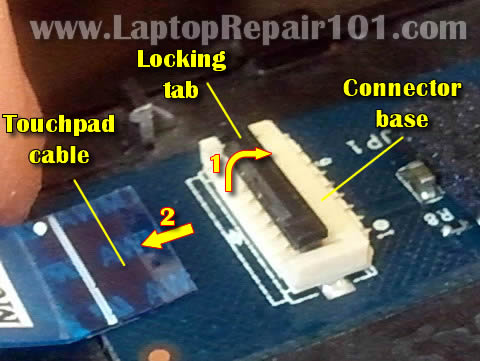
On the following picture you see a typical touchpad connector. The connector has а white base (permanently attached to the motherboard) and locking tab (moving part).
In order to unlock the connector you lift up the left side of the locking tab. The locking tap opens up at a 90 degree angle and releases the touchpad cable. After that you pull the cable from the connector.
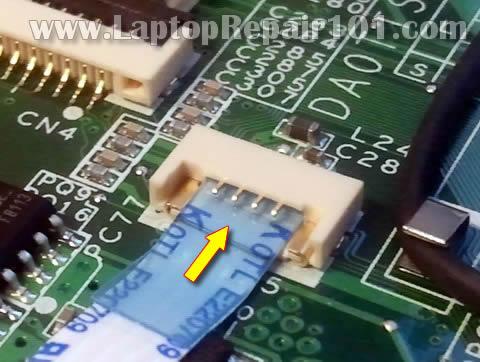
On the following picture you see the damaged connector. I wasn’t careful enough and separated the locking tab from the base.
Unfortunately there is no way to attached broken tab back.
Here’s how I fixed it.
Insert the touchpad cable back into the connector. The touchpad cable has contacts on the bottom side – the side which is facing the motherboard.
In order to work properly the cable contacts have to touch contacts inside the connector but it’s not happening when the locking tab is missing.
Find a small piece of plastic. It has to fit inside the connector and be thick enough to fit tightly between the four metal hinges and touchpad cable.
Insert this piece of plastic into the connector. Make sure the touchpad still seated inside.
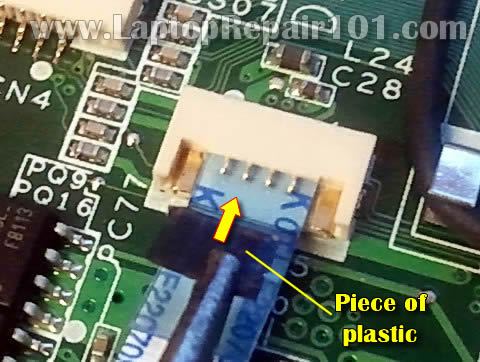
On the following picture you see the connector “fixed”. It doesn’t look the same as before but nevertheless the cable secured inside.
The piece of plastic applies pressure on the cable and it makes good connection with the contacts. The touchpad works again!
Now you can secure the connection with tape.
This simple trick fixed my touchpad.
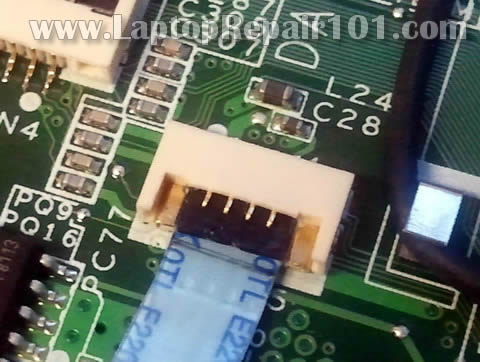
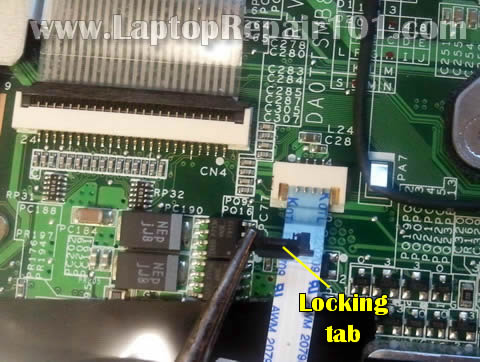
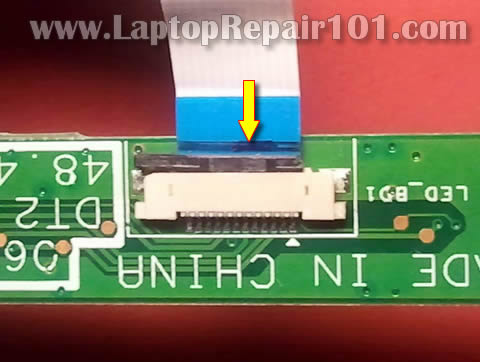
Here’s another type of touchpad connector.
The locking tab is broken and also separated from the base.
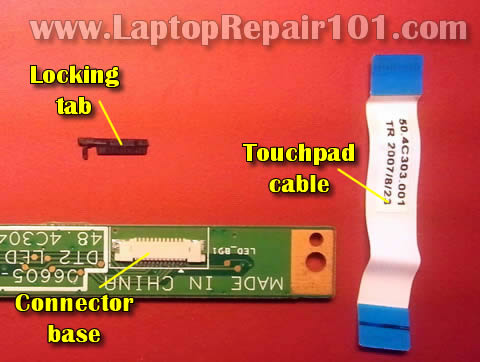
Position the broken tab the way it was plugged before but do not push it into the connector yet.
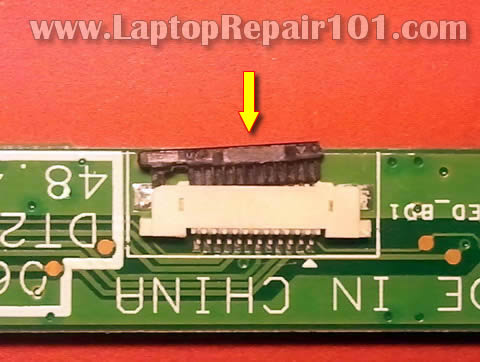
Now insert the cable. In most cases it goes under the tab.
Push the cable all the way into the connector.
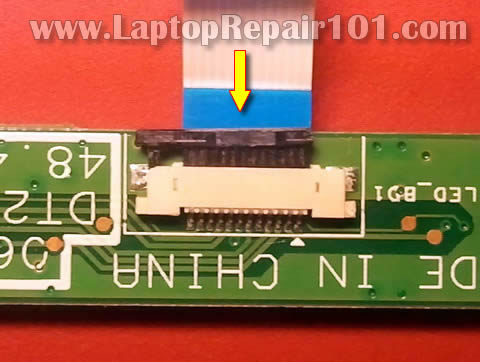
While holding the cable, push the tab into the connector.
Even though the locking tab is broken, it should secure the cable.
Again, apply some tape over the connection to secure it.
59 Responses
azeezpng
thnx
john
had the same idea but not sure if it would work. thanks for the pictures. 2 days of ideas on how to fix this turned into 2 minutes of repair
Gift
Thnk. I’ll try when i come across such challenge
michael
Holy crap the first option worked beautifully for me while fixing my friends laptop, I thought the synaptics pad was screwed when i opened the laptop to find that it was broken beyond using the original locking piece but thank god this worked xD Thank you so much! 🙂
Susanne
Thanks! It worked, and my daughter is happy again!
Naren
wauu..Thanks may help me anyday
SAMs
Man u just saved me 300 bucks
cj2600
@ SAMs,
Congratulations! I’m glad to help.
Bruce
This site reminds me of the Net of the ‘old days’ wayy back in the 90s where people pitched in without popups, surveys, ‘free downloads’, etc,etc – and when I DO manage to get another job, I am definitely PP-ing a few bucks your way. Until then, all I have is my .02: I broke the clip for the keyboard ribbon on a M35x-s309 – just the ONE END came out; the other was still in place, and my fumblefingers could NOT finesse it, so I tried exactly what you mentioned: I snipped about a 1/4″ edge off a Nicorette gum bubble pack, cleaned all the foil off it, and it worked perfectly. One side is roughened to bond the foil/paper seal, and the grip was so good, I didn’t even bother with the tape. I never liked regular tape for stuff like that, because it deterioriates after a while – but I HAVE used it more than – well, too much :-0
So, if anyone finds themselves in jam like that, check out your medicine cabinet – a lot of OTC pills are packaged like that. Just be sure to get ALL the metal off, so as not to let too much smoke out of anything on the board…
Bruce
Even better (maybe)… how do they fasten those stiff plastic (probably Mylar) tabs on the FRIENDLY ribbon cables – the clamp-less ones? If I knew, it’d become part of my bag o’ tricks. A lot of camcorders have even flimsier clamps holding cables that flex every which way – Sony seems to be good at that. I hate those almost as much as spring-loaded crap: you never know when you’re gonna get booby-trapped with one hanging by a thread. Plus, more than once, after I’d gotten the blasted things re-seated, I’ve needed to take them out AGAIN… I’m thinking to heck with that. It might be better to bond a nice Mylar tab on the end of the cable, plug it back in and call it an upgrade 😉
Adagba
Pls can u send me pictures on how 2 test and detect fault on laptops motherboard? I have the knowledge but i do find it difficult to handle some problems. Help me please
Jamir
Hello sir,
my laptop has big problem.the problem is that scroll bar is constantly going down automatically. i mean every window or any application i open it goes down and select bottom option automatically .. and even curser goes to end…
previously i thought it is virus.i tried anti-virus but didnt work then i formattd pc still in new os its coming same problm .. i thing its hardware problm. but what it is i dont knw. can u pls help me sir…
Thanku in Advance
Murph
Great info!!!! I have not had to use your solutions, but I get a lot more confident knowing some of these solutions in advance.
dave
Sweet you saved my day! 🙂
Alx
Hard to do it in a HP Mini 110, hanging in it :S
Thnx 4 the post 😀
julie
how do you fix a disabled mousepad on a laptop? i took my pc in for repair on the power jack and the son of a bitch disabled my mouse and now he wont even fix what damage he did to my headphone jack, voicemic jack…he goes by “computer wiz” on facebook, in el paso texas USA…jerk messed up my power jack and wont even honor the 30 day warranty that he gave me 3 days ago..DAM i hate being scammed.
amanda
Thank you, very useful info just managed to fix keypad myself, saved me taking it to pc repair guy!!!
Tiger_Girl
Hi Julie, Re your disables mousepad – you have to hold down shift, alt and F6 at the same time to switch disables mousepad on.
Sam Miller
Thanks so much for sharing your repair tips! Much appreciated.
cj2600
@ Sam Miller,
You are welcome. I enjoy doing this.
Bryce
THANK YOU SO MUCH!!!!!!!!!!!!!!!!!!!!!! YOU SAVED THE DAY! If I could, I would donate to you, but all I can do is tell you thanks. You truly saved the day.
Ashakur
I did broke my iphone3gs connection tab (no.3).
http://www.formymobile.co.uk/Dismantle/3gs5.jpg
Tomorrow i’ll try to repair it.
Any idea to fix it if it does work?
cj2600
@ Ashakur,
You can try using same technique as I explained in the post.
You’ll have to find a piece of thin plastic. Probably you can cut off a piece from a plastic Cola battle.
Insert this piece into the connector, between the cable and connector. Maybe this will help to secure the cable inside the connector.
arun
You saved my day. Thankyou very much 😀
Elviesa
First, sorry my poor english.
I have a question, you say “The touchpad cable has contacts on the bottom side – the side which is facing the motherboard” but you put the cable below the “pins” (?) of the connector, this it rigth?, should not be the contacts of the cable touching this “pins”, sorry for my ignorance. Thnx a lot.
cj2600
@ Elviesa,
Four silver pins shown on the picture are not contacts. They are hinges (supports) for the broken locking tab.
You don’t see the contacts because they are located under the cable.
elviesa
Thnxs a lot, its working!!!! you save me!
Bebe
Hopefully someone can help me here… my connector base is completely detached from the motherboard. What can I do? I don’t think gluing in to the motherboard would be smart…right now everything is attached and hanging around with any connection to the motherboard. I’m a bit of a novice, so any help would be wonderful 🙂
cj2600
@ Bebe,
If the connector base detached from the motherboard I assume all contacts are damaged. Gluing it back will not work.
It sounds like you might need a new motherboard.
paviliondv2
the four metal hinges just came off as i tried to detach the touch pad cable. now my touchpad does not work at all\ please need argent help………………thnx
ben s
bless, you had the exact picture of my broken connector and your solution worked the first try !
ben s
(used a yogurt plastic top and cut it with a scissors)
avoyager
paviliondv2 & cj2600, I have a similar problem: the bottom bit of the white retainer with all the contacts is still there, but the top bit over the cable is stuck to the cable and lock. Does that make sense? So I’m thinking of just laying evth onto the bottom bit and hopefully fix it down with tape. I only have Sello tape and packing tape though, should I buy different tape? I know it’s an old thread but hopefully you’re still following it, cj2600? Thank you for all your work!
John
What do you do if the contacts on the bottom of the cable are broken? Like, mine look like someone tried scratching them off cause my touchpad doesn’t work at all now. I tried wiggling the cable and everything. Can I put a small piece of metal in there? Or no?
Alfonso
Works wonderfully for my power connector (the one with 6 wires connect to the power switch board) on my ASUS laptop. The plastic part I cutted out of my document cover.
Strongly recommend for anyone with this kind of problem.
krischris
Very valuable lessons this site proffers. Thanks so much for the care. Much appreciated.
Anthony
Thanks man, you made my day! Just so you guys know, I took my piece of plastic from the bottom of a plastic cup, and it fits great into my ASUS N55SF laptop connector.
Frikkie
Thank you so much kind sir! You saved my life! And saved me 800 bucks 😀
Rej
Where can I buy spare touchpad cable from? it for a HP 15 model number P234SA
Antonio from Spain
Thanks, is a great idea. Has a problem with a motherboard and one locking tab was broken.
Kings regards
Sam
Thanks for the great tip, you’re a life saver.
Chris from Austria
bit tricky but ist works Fine on my Asus N55SL!
Thank You so much Arnd greetings from Austria 🙂
megumi
How do i fix broken wire that connected the screen and motherboard?
Wendy
Worked, thanks!
Ron
Darn fine money saver, worked on two flip up ribbon cable retainers for Dell palm rest (power button and mouse pad cables) on XPS L502X. I sill feel like a rookie though, I should know better as I normally read more than 1 instruction manual and watch more than 1 video. Used plastic from cheap convention badge, yogurt lid idea was awesome as well.
gaurav
bro u r amazing. !
you may 100 bucks for this small problem.
you r exellent, and your suggestions are really works !!
thank you, THAnk you So Much !!
God Bless YOu !!
Take care !
Kay
Hi there. Very informative blog! Any suggestions if the connector base actually came off the motherboard? (it’s the connector for the laptop speaker and I was careless when cleaning the fan.I tugged too hard and tore the whole connector base off) I’m actually not too concerned with losing the speaker functionality, but when I put everything back together, the power supply no longer seems to be supplying power to the laptop. No blinking power light when I plug in the jack. Do you think the torn off speaker connecter is affecting power flow, or is it just a strange coincidence that my power adaptor has decided to fail at the same time?
Gary
Awesum guide to repair flimsy connectors.
I replaced the main mother board in an Asus ME301T Memopad 10 tablet,
and there are 5 different connectors on the one board.None of the five are very well engineered,and can be intermittent for continuity.
I ended up with touch screen issuses and flickering,but resolved most of annoyances due to poor design.
So thanks for posting your guide bro
dinesh
Hi,
First of all thank you so much for explaining your smarter ideas with pictures.
I am facing similar kind of problem now. I opened nexus 7 tab’s mother board connector carelessly. I placed connector,cable,locking tab firmly back to the place. but touch is not responding at all in the tab. I think one of the brownish line chip on the mother board connector base is damaged and because of that contact missing touch is not working. I will be happy if you suggest me any smarter idea for me instead of buying new mother board. because new mother board cost is almost equal to the cost of the device.
Michael
Thank you. I was pulling me hair our when the little black ‘hinge’ went **FLING**!!!
get stuft
REPLACE THE BOARD! Missing lock tabs WILL cause issues down the road. You also will NOT be connecting these things laying OUT on a tabletop, they will be connected inside the laptop, where you have no elbow room nor margin for error. This is MY experience with snapped lock tabs.
Gary Folske
The ribbon clip (black/tan) came loose from the mother board on my Toshiba C50 laptop.
I can see nothing broken but cannot figure out how it remounts. Can you help?
Thanks,
Gary
Sylvia
This worked great! I broke this clip while replacing my display screen and now it works great. One other thing I need help with.. I failed to label my screws when I took them out and don’t recall where the 2 small screws go when putting my laptop back together? I thought these screws were the 2 on the bottom holding the keyboard but they seem too short and engage and lock.
I have Dell Inspiron M5030…
MANTOSH KUMAR
My acer laptop TouchPad cable destroy. What is cost of TouchPad cable. Pls help me.
Jean Claude
Hi, Thank you !
You saved my day, I just broke the connector and spent some hours trying to fix it or make it work with no success and…… I found your site …
You are on my favourites now and I am passing the message to my contacts
Have a great day
Patrick
My connector base is the second type, where I have to slot the cable vertically into the connector base. But unfortunately, I cannot not find the locking tab itself, and I am so worried because I know very well that I will not get some to buy. Please what do I do? I need your help.
Eko
Terima kasih. Thank you so much for your post. This is very usefull information and can fix my problems.. Thank you.
monu
Nice Idea!! Thanks 🙂
Juan
Thank you very much! It was of great help!